

Content last revised on November 5, 2026
Sharp LQ10D344 Display Inspection and Replacement Assessment
With the display assembly powered down, inspect the bezel gasket for uneven compression and check whether the mounting frame presses against the active display area before reconnecting the LQ10D344. Localized pressure, trapped contamination, and a distorted frame can complicate assessment of brightness uniformity or intermittent image faults. Record the existing cable orientation and mounting arrangement so that subsequent checks preserve the original assembly conditions.
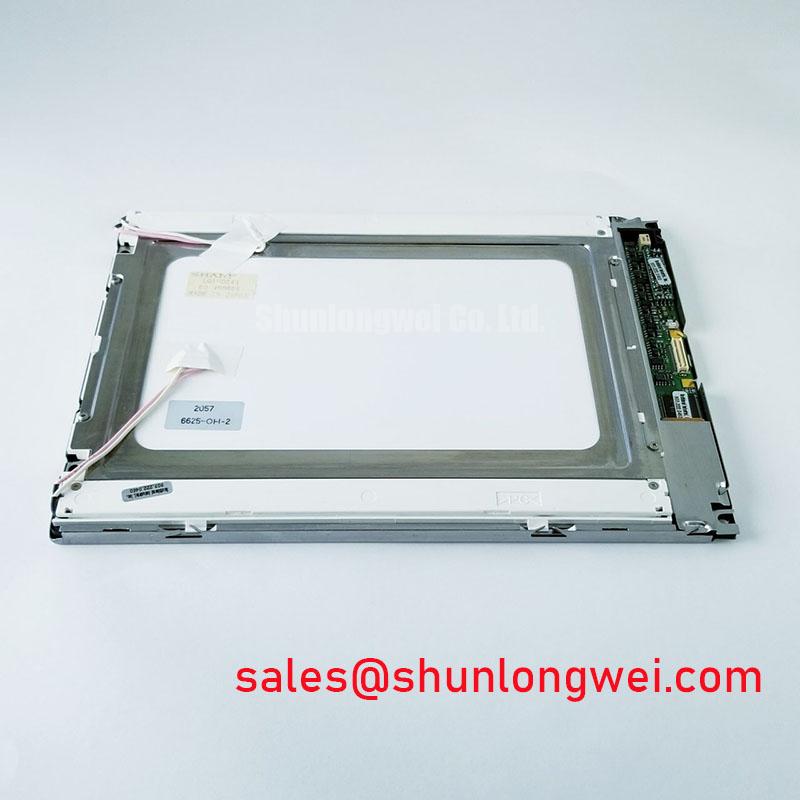
The Sharp LQ10D344 is a TFT-LCD active matrix color display module for industrial display integration. For replacement assessment, consult the model-specific datasheet for supply voltage, interface pinout, optical characteristics, operating temperature limits, and backlight requirements. Match these electrical and mechanical details before evaluating controller compatibility; the model designation alone does not establish an interchangeable display assembly.
Temperature Operating Margin and Cold Liquid Crystal Response
Compare image transitions after a stable room-temperature start with transitions during the equipment’s approved cold-start procedure. As a Design Consideration, liquid crystal response generally slows as temperature falls, which can make changing grayscale values appear delayed or leave moving graphics with visible trails. Observe the same screen pattern at each condition, recording panel temperature separately from enclosure air temperature. This helps distinguish temperature-dependent optical behavior from delayed image updates originating in the controller.
Evaluate temperature exposure against the complete assembly, including the enclosure, cable restraints, and perimeter support. As an Engineering Recommendation, allow equipment moved from a cold environment into humid air to acclimatize and any condensation to dry before energizing it. Inspect accessible perimeter areas for moisture or mechanical damage without disturbing the panel seal. Qualification of seal stability belongs to a documented environmental test; appearance alone cannot establish long-term moisture resistance.
When an image becomes unstable during a temperature transition, compare the controller output with the receiving interface requirements. As a Design Consideration, clock quality and data setup and hold margins depend on the actual interface, transmitter, cable, and receiver. An engineer should assess those margins using the applicable timing diagram and suitable measurement equipment rather than treating an optical response delay as proof of a digital timing fault.
For enclosure planning, Sharp Devices Europe Industrial Display Solutions provides manufacturer context for industrial display selection. Keep the LQ10D344 acceptance limits tied to its own specifications and the equipment’s approved environmental requirements.
Grayscale Visibility and Viewing Direction Alignment
Display a grayscale ramp and inspect it from the operator’s intended eye position before tightening the bezel assembly. As a Design Consideration, viewing direction can change the perceived separation between adjacent shades. Record whether critical text, alarm colors, and dark backgrounds remain distinguishable across the required operator positions. Treat the panel’s specified optical mode and viewing direction as selection criteria rather than assuming symmetric visibility.
Compare the image with the frame lightly supported and again after the approved fastening procedure. As an Engineering Recommendation, distribute clamping pressure through the intended mounting surfaces and keep gasket material clear of the active area. A change in localized bright patches or uneven gray fields with mounting pressure warrants inspection of frame flatness and gasket seating. It does not, by itself, identify an electrical defect.
For compatibility evaluation, an AGV or forklift telematics display would require checks of viewing position, vibration restraint, ambient illumination, and enclosure sealing. Assess screen readability under representative lighting with the actual protective window installed. Surface reflections and cover-window spacing influence the assembled result; panel contrast specifications cannot be treated as a guarantee of sunlight readability.
The LQ121S1DG31 is a separate display candidate for a documented comparison of dimensions, resolution, optical behavior, and interface requirements. It should enter a selection review through those attributes, without assuming direct substitution for the LQ10D344. As a Design Consideration, any proposed optical bonding also requires validation of adhesive compatibility, assembly stress, serviceability, and the enclosure’s sealing arrangement.
Interface Mapping and Display Timing Alignment
Trace the existing display cable against the LQ10D344 connector definition before applying power. Identify supply connections, signal returns, control signals, and image-data assignments from the correct drawing. VESA and JEIDA mapping conventions become relevant only where the documented interface uses them; they should not be applied to this model through an assumed controller setting.
As an Engineering Recommendation, investigate incorrect colors with known test patterns and the controller configuration together. Check grayscale ramps, primary colors, and fine alternating patterns to separate data assignment problems from optical uniformity concerns. Where the documented architecture divides image data between channels, compare channel assignment and synchronization. A divided or repeated image warrants checking several parts of the signal path rather than attributing it immediately to the panel.
Assess power sequencing at the display connector during startup and shutdown. As a Design Consideration, the relationship between supply stabilization, valid image data, and backlight enable can affect startup appearance. The equipment engineer should compare measured behavior with the panel and controller timing requirements, including behavior during interrupted power. Avoid changing rise times or delays solely to conceal a white screen.
Use the approved controller configuration when assessing grayscale tracking and gamma behavior. Arbitrary adjustment of internal display voltages can obscure the original fault. The The Ultimate Guide to Industrial TFT LCD Technology offers broader integration context, while the Sharp Display Solutions Official Portal provides manufacturer display information. Model-specific timing and optical acceptance remain the basis for the repair decision.
Backlight Driver Compatibility and Startup Diagnosis
Separate image generation from illumination when diagnosing a dark LQ10D344 assembly. Check whether image content remains faintly visible under suitable external illumination, then examine the documented backlight supply, enable command, connectors, and driver behavior. As a Design Consideration, this observation helps organize further measurements but does not establish which component has failed.
Keep driver testing tied to the identified backlight assembly and its specified operating conditions. As an Engineering Recommendation, compare startup behavior after thermal stabilization and inspect the supply for instability when illumination is enabled. Acoustic noise, intermittent light, and uneven brightness require separate observations; no single symptom establishes a lamp, driver, or power-supply diagnosis.
During a wider display-system review, the LQ150X1LG71 provides another Sharp module for comparing display and illumination requirements. Its driver arrangement cannot establish compatibility with the LQ10D344. Dimming behavior, connector assignments, and thermal provisions must be evaluated for each complete assembly.
As a Design Consideration, keep enclosure airflow unobstructed and inspect for localized heat near the illumination driver and display perimeter. For persistent interface graphics, an equipment-approved screen refresh or idle display strategy may help manage image retention, with recovery assessed using a neutral test pattern. Maintenance Note: Periodically inspect ventilation paths and bezel gaskets, and disconnect power before reseating display or backlight connections.