
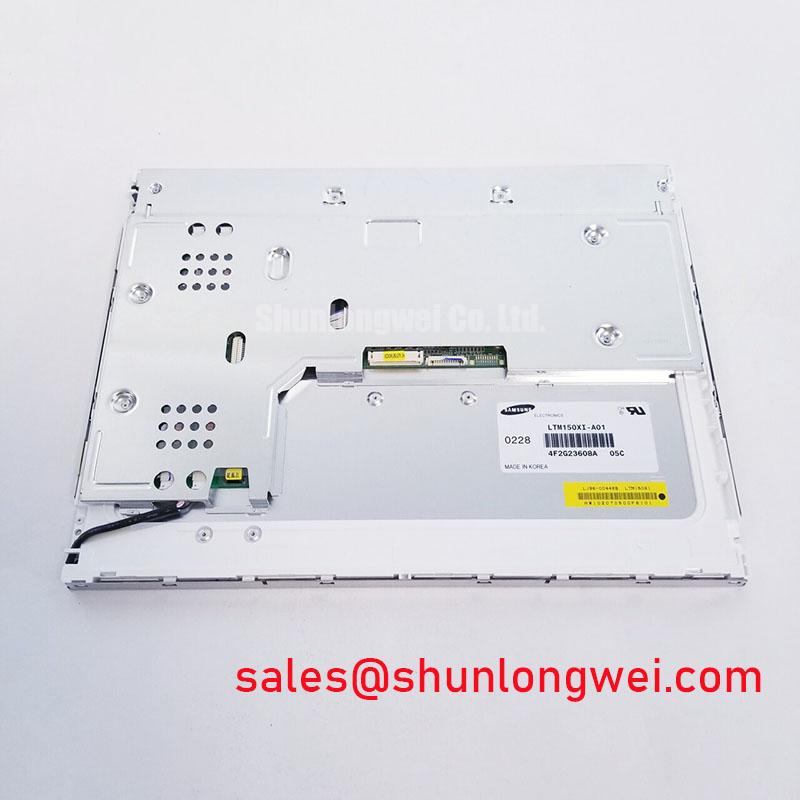


Content last revised on September 30, 2026
VESA vs. JEIDA Data Mapping Alignment & Even/Odd Channel Signal Integrity
| Model | LTM150XI-A01 |
| Manufacturer | Samsung Electronics |
| Product category | Industrial Grade LCD/HMI Panel |
| Display technology | TFT LCD Active Matrix Color Display Module |
| Specification status | Verify against the applicable factory documentation |
Probe the panel supply, ground reference, clock and data conductors, if present, at the display connector before replacing the LTM150XI-A01, then compare the observed signal sequence with a known-good system waveform.
The LTM150XI-A01 is identified as a TFT-LCD Active Matrix Color Display Module for industrial HMI and display integration. The supplied factory information does not define the complete connector pinout, logic supply voltage, interface mapping, timing table, or whether the host uses a specific VESA or JEIDA arrangement. These details must be confirmed from the original panel documentation and the equipment wiring diagram rather than inferred from the model designation.
When a screen shows split images, incorrect colors, vertical banding, or alternating channel artifacts, check the cable seating first. Inspect the connector shell for displacement, look for uneven contact pressure, and confirm that the cable shield and reference ground return to the intended system points. A continuity check with power removed can identify an open conductor, but it cannot confirm high-speed signal quality. Use an oscilloscope at the transmitter and receiver sides when the symptom changes with cable movement or temperature.
VESA and JEIDA mapping differences can place valid pixel data on the wrong bit positions. The resulting image may appear active while colors, brightness transitions, or even and odd pixel groups remain incorrect. Treat this as a mapping verification task rather than a panel failure diagnosis. Compare the host timing configuration, pixel clock polarity, data enable behavior, and channel ordering against the documentation associated with the original display assembly.
For differential interfaces, the routing objective is controlled impedance with short, balanced paths and a clean return reference. A commonly used differential design reference is 100 ohms, but the applicable value remains a system-level design consideration unless the original interface documentation specifies it for this assembly. Avoid adding test wires or long flying leads during high-speed measurements because they can introduce reflections that are not present in the installed equipment.
Power sequencing also requires direct measurement. If the host provides a logic rail and a separate enable or backlight control, record the order and rise behavior during a cold start. The values suggested in a host design must be checked against the original panel documentation; they should not be treated as confirmed ratings for this model. A failed image with an active backlight may indicate a data, timing, mapping, or supply problem, so verify each section independently.
Clock jitter and data hold performance should be evaluated across the actual industrial temperature window used by the equipment. A display that operates on a warm bench may show intermittent artifacts when the cabinet cools or when vibration changes connector pressure. Use the transmitter output, receiver input, and ground reference as the measurement points, and compare the timing margin with the host controller requirements.
For a same-class replacement assessment, engineers can review TX17D02VM2CAA-2 as a separate display option. It should be treated as an independent compatibility evaluation, with connector pinout, mechanical dimensions, optical behavior, timing, and mounting provisions checked before any substitution decision.
High-Humidity Storage Margins and Delamination Prevention Protocols
Measure insulation resistance around the display connector and inspect the front and rear perimeter for moisture traces, haze, staining, or separation before applying repeated power cycles to a unit stored in a damp cabinet.
Humidity-related faults often require separation of the panel, harness, power supply, and enclosure environment. The LTM150XI-A01 is documented here as an industrial TFT LCD active matrix color module, but the supplied factory data does not establish a qualified humidity profile, storage duration, seal construction, or delamination limit. Do not convert a general environmental test condition into a guaranteed rating for this model.
Begin with a visual inspection under controlled lighting. Look for fogging beneath the front surface, edge discoloration, local bright areas, and changes that appear after the display has warmed. Check the gasket contact area and enclosure drainage path without pressing on the active area. Mechanical pressure can create temporary optical changes and may complicate the original fault.
Low temperature can slow liquid-crystal response and make image transitions appear delayed. That observation alone does not prove permanent damage. Record the display temperature, the time from power application to stable image, and whether the response returns after the assembly reaches a normal operating condition. Compare the result with an identical known-good system when available.
For equipment exposed to condensation risk, the enclosure design should limit rapid moisture ingress and provide a controlled path for accumulated humidity. This is a Design Consideration, not a confirmed construction feature of the LTM150XI-A01. The system integrator should verify the original panel’s approved operating and storage conditions, perimeter sealing method, and allowable cleaning process.
Thermal cycling can stress the display perimeter, connector joints, mounting points, and front bezel. Use distributed support so that the panel is not forced against an uneven frame. When a replacement is installed, check that fasteners draw the bezel evenly and that the chassis does not twist the glass during tightening. Exact mounting hardware and torque must follow the equipment manufacturer’s mechanical drawing.
Image lag, uneven gray transitions, and localized haze should be documented with photographs taken at the same camera angle and brightness setting. Avoid diagnosing these symptoms from a single frame. Check the host signal, backlight behavior, ambient temperature, and panel surface condition together. A display that improves after drying may still require a controlled insulation and environmental assessment before returning to service.
For railway passenger information systems or cab signalling displays, compatibility review should include cabinet ventilation, condensation control, vibration support, cable retention, and access for service. The application example does not establish that the LTM150XI-A01 carries a railway approval or environmental certification. Any system-level safety, EMC, or environmental qualification remains the responsibility of the equipment designer and certification authority.
Reference material on panel operating principles and selection checks is available in The Ultimate Guide to Industrial TFT LCD Technology. For optical terminology, engineers may also consult Liquid-Crystal Display Polarizers and Optical Glass.
High-Voltage Striking Potential and Secondary Coil Insulation Testing
Isolate the display assembly and identify the actual backlight architecture from the original wiring before measuring any high-voltage node, because the supplied LTM150XI-A01 information does not confirm a CCFL circuit, an LED circuit, or a specific inverter arrangement.
Do not assume that a replacement panel uses the same backlight driver topology as the removed assembly. A CCFL system may involve an ignition circuit and a high-voltage secondary, while an LED system normally uses a current-regulated driver with a different protection and dimming interface. The model information provided for this product confirms the TFT LCD active matrix display category but does not publish a backlight type, striking voltage, LED current, PWM range, optical lifetime, or driver fault code.
When a display is dark, first separate the image path from the illumination path. Use a controlled light source at the front surface to determine whether image content is present. Then inspect the backlight connector, driver enable signal, current feedback path, and supply input according to the equipment schematic. A dark screen can result from missing image data, a disabled backlight, protection shutdown, connector damage, or a host power fault.
High-voltage testing requires an appropriately rated probe, controlled access, discharge verification, and procedures established by the equipment safety documentation. Do not apply a generic 1500 to 1650 Vrms striking assumption to this model. If the original assembly contains a high-voltage secondary, the insulation test level, duration, leakage limit, and discharge method must come from the approved service procedure.
When an LED driver is present, inspect for open strings, shorted channels, current-sense abnormalities, and repeated restart behavior. A driver may shut down when its feedback conditions are outside the system limits, but the observed shutdown does not identify one component without waveform and resistance checks. Capture the enable, PWM, supply, and fault output signals during startup to distinguish a command problem from a protection response.
PWM dimming should be evaluated for visible flicker, camera banding, acoustic interaction, and compatibility with the display controller. A 200 Hz to 1 kHz range is not an official specification supplied for the LTM150XI-A01, so it must not be presented as a guaranteed operating range. Select the control method and frequency from the original driver documentation and verify the result at minimum and maximum brightness.
Claims involving a 1000:1 dimming ratio, more than 50,000 hours of half-life, MTBF, or acoustic noise require a manufacturer test report or applicable system qualification record. No such values are established in the supplied product data. Treat brightness stability, lifetime, and audible behavior as verification items during equipment-level testing rather than as fixed attributes of this listing.
⚠️ Field Alert: Disconnect power and verify stored energy has discharged before removing the display cable or probing a backlight connector.
High-Nits Edge-Lit LED Rail Thermal Dissipation and Light Guide Preservation
Measure the temperature distribution across the bezel, backlight connector, driver area, and adjacent chassis during a sustained bright-screen test before changing the mechanical heat-spreading arrangement.
The supplied information identifies the LTM150XI-A01 as a TFT LCD active matrix color display module, but it does not confirm an edge-lit LED construction, a light guide material, rated luminance, thermal rail geometry, or an L70/B50 lifetime value. Avoid assigning these characteristics to the model without an applicable factory document.
Thermal troubleshooting starts with the installed assembly. Record ambient temperature, display brightness command, supply behavior, and the temperature at accessible mechanical surfaces. Look for localized heating near the backlight connector or driver board, then compare the pattern with a known-good unit. Uneven brightness, yellowing, or corner shading can have optical, electrical, mechanical, or environmental causes.
If the equipment uses an edge-mounted light source, the chassis should provide a stable thermal path without compressing or bending the display. An aluminum spreader may be considered by the system designer when it improves heat distribution, but its size, interface material, attachment method, and temperature limit must be determined from the actual mechanical design. Do not assume that a particular rail arrangement is part of the LTM150XI-A01 construction.
Any light guide, diffuser, reflector, or optical sheet must be handled according to the original service instructions. Avoid scraping optical surfaces, introducing dust into the bezel, or applying pressure to the active area. The supplied data does not confirm whether a PMMA light guide is used, so PMMA-specific yellowing behavior should not be used as a definitive diagnosis for this model.
Sunlight readability is also a system result. Front cover transmission, polarizer condition, ambient reflection, viewing angle, backlight output, and controller settings all affect the observed image. The commonly quoted contrast or illuminance figures in a design brief should be tested against the installed optical stack; they are not official LTM150XI-A01 ratings in the information supplied here.
For displays used in railway passenger information systems or cab signalling panels, inspect the frame for vibration transfer, cable strain, and thermal expansion clearance. These checks support compatibility assessment but do not establish railway qualification. The final design team should validate image stability, brightness control, temperature rise, shock and vibration response, EMC behavior, and service access at the complete equipment level.
When a screen becomes dim after warm-up, compare backlight command, driver input power, current feedback, and panel temperature before replacing the display. When brightness varies across the surface, inspect the optical stack and mounting pressure as well as the electrical drive. This multi-point approach avoids assigning a single cause to a symptom that may originate in the panel, driver, harness, enclosure, or host controller.
Use the original equipment documentation to confirm the LTM150XI-A01 connector assignment, supply requirements, timing, backlight interface, mechanical envelope, and environmental limits. Those checks determine whether the panel can be integrated into the intended HMI, passenger information display, or cab signalling subsystem.