Content last revised on October 13, 2026
Contrast Stability and Temperature-Dependent Liquid Crystal Behavior
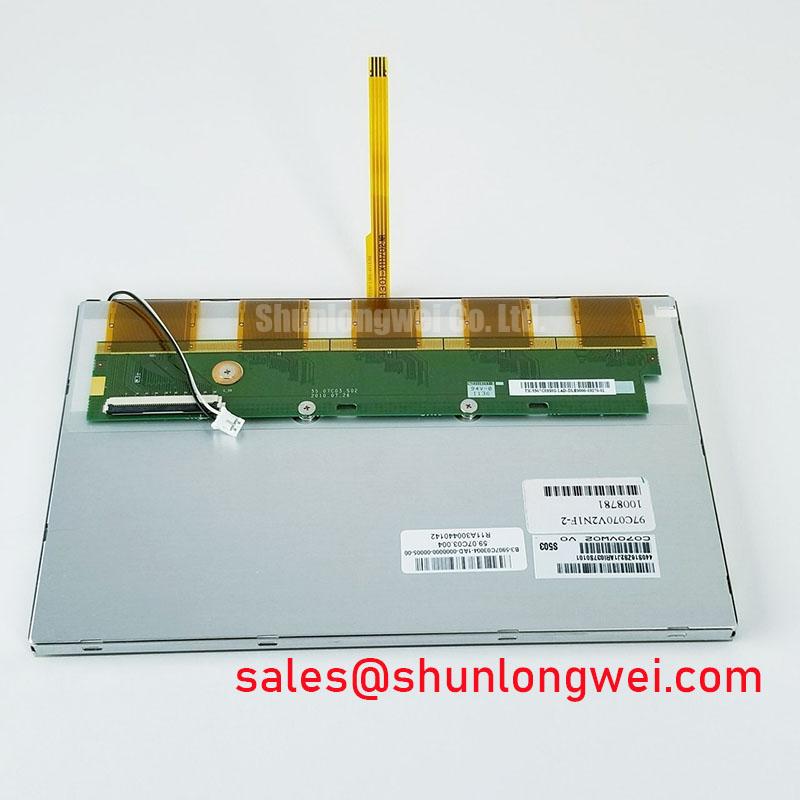
When a precision electronic test instrument shows washed highlights, grayscale inversion, or unstable contrast, first compare the image at the center and edge of the viewing area under the same illumination. The C070FW02-V2 is identified as an AUO TFT-LCD active matrix color display module, so optical behavior must be assessed together with the host controller, backlight circuit, viewing angle, and front-window arrangement rather than judged from the panel alone.
TN, IPS, and MVA technologies can produce different grayscale transitions and viewing-cone behavior, but the supplied product classification does not confirm a specific liquid-crystal mode for this model. During replacement evaluation, use the original panel documentation and a known-good display to compare dark-level detail, mid-gray uniformity, and color shift as the viewing position changes. A symmetric viewing specification such as 85°/85°/85°/85° must not be assigned to this model unless it is stated in the applicable AUO datasheet.
Ambient illumination also changes the perceived contrast ratio. A surface with anti-glare treatment can reduce reflected images from lamps and windows, while excessive surface diffusion may soften fine instrument markings. This is a system-level optical result involving the panel surface, cover glass, bonding layer, and enclosure geometry. Winstar’s industrial TFT-LCD and OLED display information provides useful industry context when comparing optical integration methods without treating another manufacturer’s data as AUO specifications.
For a high-EMI factory environment, the digital video path should be routed as a controlled transmission interface. A 100 Ω ± 10% differential target and a skew budget of no more than 50 ps may be used as a Design Consideration when the host system employs differential display signaling; these values are not confirmed factory ratings for the C070FW02-V2. Measure the complete cable and connector path, then inspect whether contrast changes coincide with data errors, backlight variation, or temperature drift. The broader principles are discussed in The Ultimate Guide to Industrial TFT-LCD Technology.
Digital Video Bus Synchronization and Logic Power Rail Verification
Split-screen images, incorrect color planes, and intermittent white screens require a timing and interface review before replacing the display. The product description identifies the C070FW02-V2 as a TFT-LCD module, but it does not establish the exact connector pinout, logic rail, pixel clock limit, JEIDA/VESA mapping, or power-on sequence. The system integrator should verify those items from the original panel documentation and the equipment service schematic.
For a TTL 24-bit RGB implementation, trace the red, green, and blue data groups separately and check that each group reaches the panel connector with consistent reference grounding. A 100-ohm differential impedance target applies only where the particular host interface uses differential pairs; it should not be transferred automatically to single-ended TTL conductors. Confirm the actual electrical topology before applying a transmission-line rule.
Logic supply behavior deserves attention during a field replacement. A 3.3 V or 5.0 V rail must not be selected by assumption. Observe the panel supply, enable signal, reset behavior, and video timing together during startup. The commonly assessed rise-time window of 0.5 ms to 10 ms may serve as a system-level engineering reference when required by the host design, but it is not an official C070FW02-V2 rating supplied here. If the panel starts before valid video data, the result may appear as a white screen, unstable raster, or residual image during power removal.
In an LVDS implementation, JEIDA and VESA color mapping differences can place color bits in the wrong significance order without creating a total loss of image. Compare a full-color test pattern, grayscale ramp, and fine text screen with the original unit. If only one color group or one half of the image is affected, inspect mapping, connector seating, and cable strain before changing the panel. Tianma’s industrial display technology resources offer useful comparative background on display interface integration, but they do not define this AUO model.
Backlight service requires the same separation between product data and system assumptions. A constant-current driver, dimming control, and thermal environment influence brightness aging. A statement such as 50,000 hours to 50% brightness is often used in display industry specifications, yet no such lifetime figure is confirmed here for this exact module. Treat it as an external rating that requires documentation, not as a guaranteed value. For long static screens on test instruments, rotate displayed content where the equipment software permits and inspect for image retention after controlled operating periods.
Thermal Cycling Degradation of Polarizer Adhesives and Sealant Gasket Integrity
Cold-start evaluation should focus on response lag, uneven gray transitions, condensation risk, and changes in perimeter appearance. As liquid-crystal viscosity increases at sub-zero temperatures, gray-to-gray response can become slower and motion may appear smeared. This physical tendency is a Design Consideration, not a confirmed environmental rating for the C070FW02-V2. The available product classification alone does not establish operation across −30 °C to +85 °C.
For equipment exposed to repeated temperature changes, inspect the front polarizer, perimeter seal, gasket contact, and cable exit after the enclosure reaches thermal equilibrium. Look for lifting edges, localized haze, pressure marks, or moisture under the viewing window. These observations do not identify a single failure cause, but they help separate optical-layer stress from a controller or backlight fault. A thermal chamber profile should be derived from the instrument’s actual operating and storage requirements, with powered and unpowered stages assessed separately.
Direct sunlight makes contrast evaluation more demanding. No ambient-light contrast specification is confirmed here for this model. Use the original instrument’s optical stack, front glass, anti-glare surface, and backlight level when judging readability. Compare black-field detail, reflected lamp images, and fine alphanumeric characters rather than relying on a single visual impression.
Gasket integrity also affects condensation control. The bezel should compress the seal evenly without forcing the display cell against a rigid chassis surface. When the equipment moves between a cold storage area and a warmer production floor, allow the enclosure and panel to equalize before applying power where moisture may have formed. The maintenance plan should record changes in display uniformity, touch or keypad alignment where applicable, and cable flexibility after thermal exposure.
Polarizer cleaning should use a compatible method specified for the instrument’s front surface. Avoid aggressive solvents, concentrated pressure at the panel edge, and wiping practices that load one corner of the cell. If the display is used for persistent measurement screens, schedule visual checks for retained icons, uneven brightness, and local haze while the unit displays a neutral gray test pattern.
Flush-Mount Open-Frame Bezel Integration and Perimeter Gasket Shock Isolation
Mechanical integration begins with the original chassis envelope, connector clearance, panel viewing aperture, and gasket land. The supplied information for the C070FW02-V2 does not provide confirmed outer dimensions, mounting-hole locations, bezel limits, or fastener specifications. Measure the existing opening and compare the replacement mechanically before applying pressure to the cell or its flexible cable.
Use a floating or compliant support strategy where the enclosure experiences vibration. The bezel should hold the assembly against the gasket while allowing the display stack to remain free from concentrated chassis loads. A cross-pattern tightening sequence is a Design Consideration for distributing compression. Fastener torque should follow the original equipment manufacturer’s mechanical specification; no AUO factory torque value is confirmed here for this model.
Localized force can create dark-field mura, brightness nonuniformity, or light-guide compression marks. These effects may change when fasteners are loosened, when the chassis is warmed, or when the panel is viewed from an angle. Check the display before final tightening, after tightening, and after a short thermal soak. If the pattern follows a bracket, spacer, or cable bend, correct the mechanical load path rather than compensating through image settings.
Flexible cable routing needs a generous, smooth bend path with no sharp fold at the connector exit. The connector lock should be fully engaged, and the cable should not carry the weight of the display assembly. During service, isolate power before removing or inserting the flexible cable. After reconnection, inspect the latch, contact alignment, and strain relief before powering the instrument.
PWM backlight control is another host-system issue. A 200 Hz to 1 kHz PWM range may be evaluated as a Design Consideration when visual flicker, camera banding, or audible interaction with the driver is reported, but the correct frequency and duty-cycle behavior must be established by the backlight driver and panel documentation. Check brightness linearity at several command levels and observe the result through the instrument’s normal optical window.
Maintenance Note: Inspect the enclosure air path and gasket seating during scheduled service, because blocked cooling or uneven sealing can accelerate optical drift and increase condensation risk.
Before releasing the repaired instrument, run a neutral-gray screen, fine-text pattern, full-color raster, and dark-field image through the complete power cycle. Confirm that the panel remains mechanically relaxed, the flexible cable remains undisturbed, and the display returns cleanly after controlled power removal.