

Content last revised on October 17, 2026
Flashlight Dark-Shadow Optical Diagnostic to Isolate Logic vs. Backlight Failure Modes
Direct the flashlight across the screen while the host presents a known image, then move the light to distinguish displayed content from surface reflections. Design Consideration: recognizable content with absent illumination supports investigating the backlight power path and control signals. A blank result leaves several possibilities open, including missing image data, incorrect power sequencing, or a panel fault.
With a compatible controller and stable illumination, display red, green, and blue fields sequentially. Follow these with a grayscale pattern to distinguish color channel abnormalities from shading and tonal discontinuities. Record whether a line stays at the same screen position across patterns. Persistent lines warrant comparison with the cable, controller output, and panel drive path; their appearance alone cannot establish a microscopic bond fracture or a particular internal construction.
Compare supply startup, image enable, and illumination enable against the equipment service sequence. A white screen during startup can accompany missing image drive or sequencing problems, so capture the relevant signals together rather than replacing the panel on that symptom alone. For shutdown image persistence, inspect the documented signal disable and supply discharge sequence before attributing the effect to permanent panel damage.
Field Alert: Disconnect equipment power and allow the documented discharge interval before unplugging or reseating display and illumination connectors.
Inspect connector seating, latch engagement, cable strain, and contact condition with power removed. After reconnection, compare behavior using the same test image and operating conditions. Backlight service life and brightness depreciation are separate from this functional check; neither a fixed operating life nor a brightness retention rating is established by the supplied product identification.
Surface Anti-Glare (AG) & Anti-Reflective (AR) Coating Evaluation for High Ambient Readability
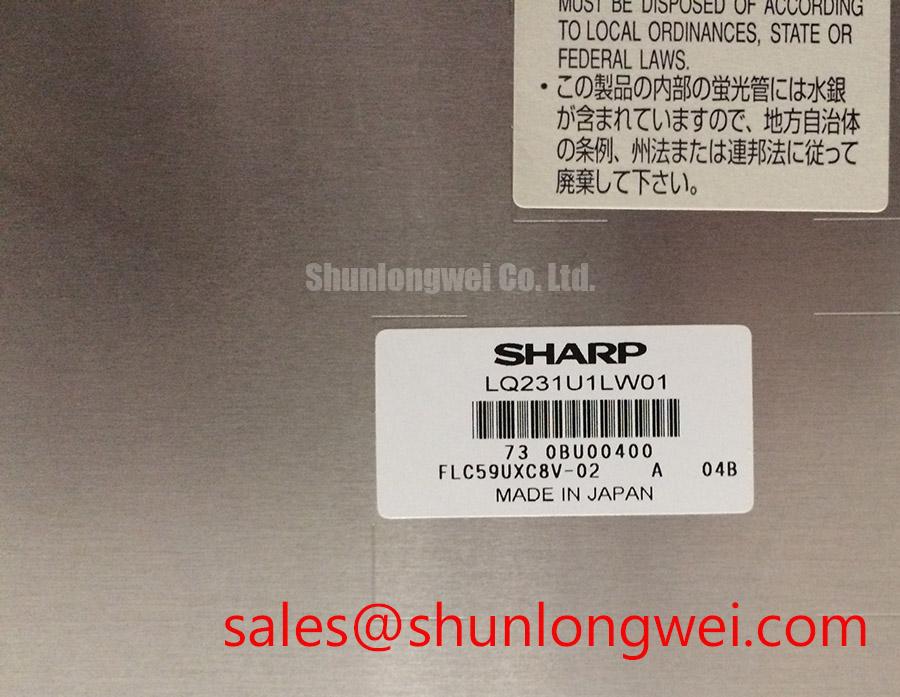
Inspect reflections with the protective window and surrounding enclosure in their installed positions, because the complete optical stack determines what the operator sees. Design Consideration: anti-glare treatment redistributes reflected light, while an anti-reflective treatment reduces reflection at treated interfaces. These mechanisms differ, and neither treatment should be attributed to the LQ231U1LW01 without its optical specification.
Move a grayscale image through the intended operator viewing positions and observe whether dark tones brighten, colors shift, or neighboring gray levels become difficult to distinguish. Viewing behavior depends on the panel technology and viewing direction. Adjusting the installation angle can improve usability, but it does not establish that this module uses IPS, MVA, or a symmetrical viewing cone.
For replacement screening, compare the actual panel requirements before treating a shared product category as evidence of interchangeability. The NL8048AC19-14F provides another display product reference for that comparison; a direct replacement relationship requires matching electrical, optical, and mechanical documentation.
| Selection checkpoint | Sharp LQ231U1LW01 | NL8048AC19-14F comparison requirement |
|---|---|---|
| Product identity | Sharp TFT-LCD active matrix color display module | Separate display model; assess independently |
| Resolution and active area | Consult datasheet | Match image mapping and visible opening |
| Supply, interface, and pin assignment | Consult datasheet | Compare connector functions and electrical requirements |
| Outline, mounting, and optical performance | Consult datasheet | Compare drawings and specified viewing conditions |
| Replacement status | Original equipment compatibility governs selection | No direct interchangeability established here |
A marine radar or navigation bridge console is a potential compatibility assessment context, subject to equipment approval, enclosure protection, readable contrast, and environmental qualification. Optical bonding can reduce internal reflections, but adhesive compatibility, assembly stress, and serviceability require assessment at the complete display assembly level. Bonding alone does not establish moisture resistance or salt exposure suitability.
Chassis Fastener Torque Assessment to Control Optical Mura Defects
Check that the module sits against its intended mounting surfaces without bezel pressure on the viewing area. Design Consideration: uneven restraint can contribute to visible nonuniformity, so compare dark and mid-gray images before installation and after fastening. Use the equipment drawing to establish screw engagement, spacer height, and tightening requirements rather than assigning a generic torque from screw diameter.
If a patch changes after the assembly is removed from a distorted bracket, investigate the support geometry and cable loading. Avoid pressing the screen to reproduce the symptom. Local shading can have several causes, and a mechanical response should guide inspection without becoming proof of a particular internal optical defect.
Route the display cable with controlled strain relief and preserve the original shielding and chassis bonding arrangement. Where the documented interface uses differential signaling, assess pair routing, connector transitions, and cable construction against the transmitter and receiver requirements. Impedance, skew, and timing limits belong to that interface specification; they are not universal LQ231U1LW01 installation values.
During power path assessment, distinguish a display module from the circuitry supplying its illumination. The TX18D210VM0BAA is a separate display product reference, not evidence of a compatible auxiliary driver or interchangeable power stage. Connector appearance cannot establish a shared power topology.
Constant Luminance Output Control & Backlight Reliability Verification
Measure luminance after the assembled display has stabilized, keeping the test image, brightness command, viewing geometry, and ambient conditions consistent. Design Consideration: compare brightness changes with illumination supply behavior and enclosure temperature before attributing dimming to backlight aging. Automatic compensation can conceal depreciation while increasing electrical or thermal demand, depending on the actual control implementation.
Inspect temperature distribution around the display perimeter, driver location, and mounting interfaces. Any added heat spreading structure should be evaluated for electrical clearance, mechanical loading, and its measured effect inside the enclosure. The module identification does not establish an internal light guide material or justify a prescribed rail geometry.
For LED systems, L70 describes a lumen maintenance threshold, while B50 describes a population fraction associated with a stated criterion; neither is interchangeable with mean time between failures. Applying such a rating to this module requires a manufacturer specification defining the light source, operating conditions, and test basis. The Sharp Devices Europe and Sharp Display Solutions portals provide manufacturer context for display technologies and product support.
When grayscale errors change with temperature, compare the host timing and accessible panel supply waveforms with the service limits before adjusting gamma settings. Where the design exposes gamma reference measurements, use the specified test points; exploratory probing can disturb sensitive circuits. For persistent static images, evaluate controller screen blanking or content movement against operational requirements and check recovery using varied content. The distributor’s Industrial Display & HMI Solutions guide provides broader integration context for enclosure, thermal, and interface assessment.