

Content last revised on September 12, 2026
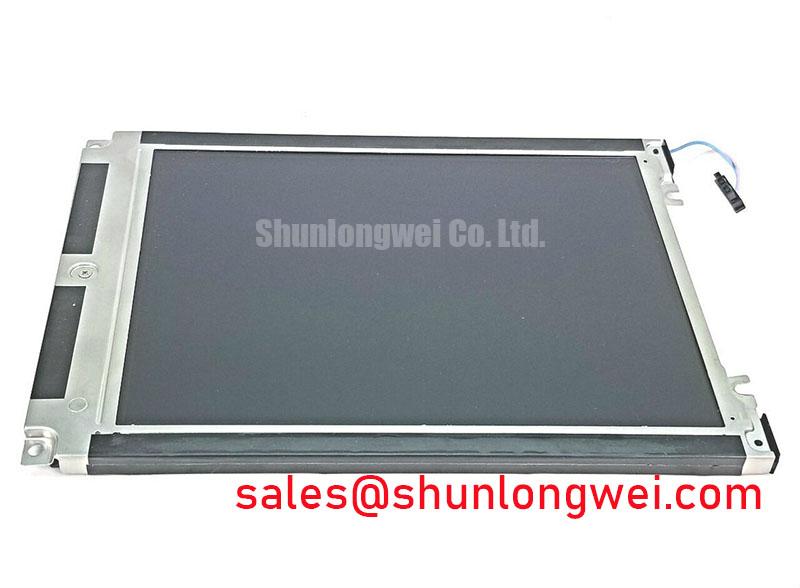
DMF682ANF Kyocera OPTREX Industrial Grade TFT LCD HMI Panel
Begin incoming inspection by checking the DMF682ANF label against the equipment service record, then examine the TFT LCD display module under controlled illumination for cracked glass, bezel deformation, connector damage, and visible contamination. Before applying power, confirm that the replacement panel matches the original assembly position and that the host controller documentation identifies the same display interface and supply requirements.
The DMF682ANF is identified in the supplied factory context as a Kyocera / OPTREX Industrial Grade LCD/HMI Panel. Its package or enclosure classification is TFT-LCD Display Module. The available factory information does not state a panel size, active area, resolution, luminance, contrast ratio, supply voltage, connector pinout, touch function, viewing mode, or operating temperature range. Those values should be taken from the original panel documentation or the equipment manufacturer’s service data before installation.
| Parameter | Available specification |
| Model | DMF682ANF |
| Manufacturer | Kyocera / OPTREX |
| Product category | Industrial Grade LCD/HMI Panel |
| Construction classification | TFT-LCD Display Module |
| Specification status | Limited factory information available |
For procurement and maintenance records, retain the original panel part number, connector orientation, cable routing, mounting pattern, controller configuration, and display calibration data. A visually similar industrial LCD can still be electrically or mechanically incompatible. The system integrator should verify the required supply voltage from the original panel documentation and confirm the host timing configuration before connecting the DMF682ANF.
Incoming Benchtop Inspection: COG/TAB Anisotropic Conductive Film Integrity
Use a three-stage primary-colour bench test after the visual inspection: display a red field, a green field, and a blue field from a known-good controller output. Observe the panel directly and record whether defects remain fixed in one location, follow the image data, or change with cable movement. A clean white field and a black field can then help separate uniformity concerns from individual line or sub-pixel abnormalities, but this test should be interpreted as an inspection method rather than a proof of a single failure mechanism.
For a dark screen, place a flashlight at approximately 45 degrees to the front surface and inspect the panel without pressing the glass. If image content becomes faintly visible, the backlight path requires separate checking from the image-generation path. Inspect the backlight power circuit, enable signal, brightness control path, and mechanical cable connection against the equipment schematic. A dark region that remains visible with the oblique-light test may also require examination of the controller, timing circuitry, or panel-side driver connections. It should not be assigned to a single cause without comparison with a known-good signal path.
COG and TAB bonding areas are mechanically sensitive. Look for line defects that begin at the glass edge, irregular vertical bands, intermittent rows, or changes that occur when the assembly is moved within its normal mounting position. Do not press the bezel or bonded edge to force an image change. Such handling can create a misleading temporary result and may add mechanical stress during diagnosis. An oscilloscope comparison at the host-side interface can help determine whether the displayed fault is associated with clock stability, data timing, cable contact, or the panel assembly itself.
TTL and LVDS are not interchangeable assumptions. The correct interface type, lane arrangement, clock polarity, data mapping, and power sequence must be verified from the original panel documentation. For an LVDS installation, designers should evaluate transmitter clock jitter, data hold time, pair routing, termination, and temperature-related timing changes as a complete system. If the available DMF682ANF record does not state these limits, they remain Design Considerations, not factory specifications. The host controller should be tested across its actual industrial operating window with the installed cable and enclosure.
Use The Ultimate Guide to Industrial TFT LCD Technology as a technical reference when reviewing TFT signal paths, panel selection terminology, and common display integration misunderstandings. It does not replace the original DMF682ANF documentation for electrical compatibility.
⚠️ Field Alert: Switch off and isolate the equipment before inserting or removing the display cable, because an energized connector can expose signal and supply contacts to an avoidable electrical transient.
Thermal Expansion Clearance Sizing across Heavy Industrial Metal Enclosure Cutouts
Before fitting the DMF682ANF into a metal enclosure, compare the original panel’s bezel envelope, glass position, connector clearance, and mounting-hole locations with the replacement assembly. The supplied factory data does not provide mechanical dimensions, so the enclosure drawing and the removed panel must control the cutout assessment. Check for contact between the glass, bezel, cable, and chassis during insertion rather than relying on nominal appearance.
Mechanical installation should distribute retention force evenly around the panel. A rigid metal cutout can transfer local stress into the bezel or glass when the enclosure and display assembly change temperature at different rates. As a Design Consideration, use a cross-pattern tightening sequence and follow the equipment maker’s specified fastener torque. Any general torque reference must be treated cautiously because the final value depends on the enclosure design, fastener material, gasket arrangement, and panel documentation.
Inspect the display at low and high equipment temperatures after mechanical installation. Look for changes in corner brightness, pressure marks, dark-field mura, or image non-uniformity that appear only after the bezel has been secured. Do not correct an optical defect by progressively tightening the fasteners. Release the mechanical load, inspect the cutout and support surfaces, and compare the panel in an unloaded bench condition. Any thermal expansion allowance must be determined by the complete assembly, including the enclosure, mounting hardware, sealing materials, and panel frame.
Signal integrity deserves the same attention as mechanical clearance. Where the host uses LVDS, route the differential pairs as a controlled, continuous path and avoid unnecessary stubs, sharp discontinuities, and unreferenced sections near switching power hardware. A nominal differential impedance of 100 Ω with a tolerance of ±10% is a common Design Consideration for LVDS routing, not an official DMF682ANF parameter in the supplied record. Pair skew, clock margin, connector quality, and cable construction should be validated using the actual controller and cable assembly.
Do not infer that the DMF682ANF includes optical bonding, a sealed front surface, a touch sensor, or a particular light-guide construction from its TFT-LCD classification alone. If the display is considered for a high-precision surgical navigation or ultrasound diagnostic display, the equipment manufacturer should verify optical stack compatibility, surface treatment, cleaning requirements, enclosure sealing, calibration behaviour, and applicable system-level safety documentation.
Radiated Emissions Compliance via Backplate Multi-Point Star Grounding
When a display is installed near a variable-frequency motor drive or another high-noise switching source, begin the interference investigation with cable placement and return-current paths. Observe whether pixel jitter, horizontal bands, or unstable image regions change when the display cable is rerouted, clamped, or separated from power conductors. This comparison can indicate coupling or reference-path sensitivity, but it does not establish a single root cause.
A shielded FFC or LVDS cable should be evaluated as part of the host enclosure’s grounding strategy. The shield termination, connector shell, backplate, chassis bonding, and controller reference must provide a controlled path appropriate to the equipment topology. Multi-point or star-ground arrangements can be considered where they reduce unintended return-current circulation, but the correct arrangement depends on the enclosure, cable construction, protective-earth scheme, and system frequency content. The DMF682ANF factory context does not specify an EMC grounding method.
Common-mode ferrite components may be evaluated when conducted or radiated interference is confirmed, provided their impedance characteristics, current capability, signal impact, and placement are checked on the real cable assembly. A ferrite that reduces one interference band can also affect edge shape or timing. Engineers should verify the display waveform at the panel interface and compare the result with the known-good path before treating a filter as a corrective measure.
Radiated emissions compliance belongs to the completed equipment. A display module does not independently establish CISPR Class A or Class B compliance for an assembled product. The final enclosure, power supply, controller, cable shielding, grounding, and operating mode must be assessed through the applicable system-level EMC process. Use SPICE where circuit simulation helps examine power or signal behaviour before bench testing, while recognising that simulation does not replace emissions measurements. Materials and regulatory records should also be reviewed against the applicable Restriction of Hazardous Substances Directive requirements for the complete equipment supply chain.
For service work, document the original cable length, routing, shield termination, connector retention, and controller settings before substitution. A replacement cable with a different construction can alter signal quality even when its connector appears identical. If noise remains after the cable path is restored, inspect the display power rail, controller ground reference, backlight switching path, and nearby drive wiring with appropriate differential probes and isolation procedures.
Surface Anti-Glare and Anti-Reflective Coating for High Ambient Readability
Assess readability at the actual installation angle and under the expected ambient light, first with the display powered and then with the screen showing black, white, grey, and representative diagnostic images. Reflections from surgical lighting, ultrasound room fixtures, enclosure windows, and overhead luminaires can conceal low-contrast content even when the panel itself is operating correctly. Record the result with the original optical stack and compare the DMF682ANF only after confirming that its surface treatment and mechanical position match the equipment requirement.
Anti-glare and anti-reflective treatments address different optical problems. An anti-glare surface can scatter a strong reflection across a wider area, while an anti-reflective treatment is intended to reduce reflected light at the surface. The available DMF682ANF factory information does not identify an AG or AR coating, surface haze value, reflectance value, or chemical-cleaning rating. The integrator should therefore verify the surface specification before selecting cleaning agents, protective films, or an external window.
Viewing-angle behaviour must also be confirmed from the original panel documentation. TN, IPS, and MVA technologies can produce different changes in contrast, colour, and grayscale perception as the operator moves away from the normal viewing axis. A symmetric 85°/85°/85°/85° viewing specification is sometimes used as a general display comparison reference, but it is not an official DMF682ANF value in the supplied data. It should not be assigned to this model without a manufacturer document.
T-CON timing and gamma control affect the way grayscale transitions appear in dark diagnostic imagery. When replacing a panel, verify the controller’s timing configuration, grayscale voltage settings, gamma table, image orientation, and backlight control method against the source equipment. A panel that powers up and shows an image may still require system-level calibration if the optical and electrical characteristics differ from the removed unit. Avoid changing gamma values until the signal path, supply stability, connector seating, and image format have been checked.
Cold-environment testing should be performed only within the confirmed operating-temperature specification. Liquid-crystal response can change as temperature falls, but the magnitude and acceptable behaviour depend on the panel construction, drive conditions, enclosure heat flow, and controller configuration. A heater strip, if present in the equipment, must be evaluated as part of the original thermal-control design. The DMF682ANF record supplied here does not establish a −20 °C to −30 °C operating rating, response-time value, heater requirement, or optical-bonding capability, so those conditions require direct documentation and system validation.
For a potential high-precision surgical or ultrasound diagnostic display replacement, the purchasing engineer should match the complete optical and electrical specification rather than the model number alone. Confirm the panel identity, controller compatibility, surface requirements, mechanical envelope, cable arrangement, calibration process, and equipment-level compliance records before releasing the unit for field installation.