Content last revised on October 19, 2026
CCFL Ballast Capacitor Impedance Matching and Tube Operating Current Stabilization
When a machine-tool HMI shows a dim screen, a delayed start, or uneven illumination, I first separate the LCD logic fault from the CCFL ballast fault. The LM5Q32 uses a CCFL backlight, so the ballast, lamp wiring, connector insulation, and return path require inspection before replacing the display module. The panel’s official typical contrast ratio is 10:1, but a weak lamp or unstable ballast can make the practical image appear much poorer than the rated optical characteristic.
CCFL ignition requires a high-voltage starting pulse, followed by a lower sustained operating condition. These ballast-side values are system-level design considerations rather than confirmed factory ratings for the LM5Q32. During service, use the original ballast documentation and approved high-voltage measurement equipment to verify ignition behavior, lamp current regulation, insulation clearance, and waveform stability. A ballast that repeatedly attempts to strike the tube can create visible flicker, intermittent illumination, or progressive stress at the lamp connection.
Check the ballast capacitor and lamp connector for heat discoloration, surface contamination, and signs of tracking. Impedance matching should be evaluated as a complete ballast and tube circuit rather than by substituting a capacitor with a similar physical size. The target is stable lamp operation without excessive starting stress. If the screen lights but the image remains unstable, compare the ballast output with a known-good assembly and inspect the return path before assigning the fault to the LCD glass.
The display interface is specified as 4-bit parallel. Confirm that the host controller’s data arrangement matches the original machine wiring and that the control timing remains stable during backlight ignition. Where the system uses frame, line, or clock control signals, observe them independently from the high-voltage backlight circuit. Separating the logic and ballast checks prevents a backlight transient from being mistaken for a digital bus failure.
Negative Bias Rail and Contrast Drift Compensation
Contrast loss on an STN monochrome display should be investigated through the liquid-crystal bias supply, temperature behavior, and connector condition. The LM5Q32 has an official 5.0V logic operating voltage; this does not by itself define every bias rail required by the host circuit. The system integrator should verify the negative bias arrangement from the original panel documentation and measure ripple under operating load.
A drifting negative rail can alter the apparent contrast even when the 5V logic supply remains steady. Use an oscilloscope with a suitable probing method to check ripple, startup behavior, and load response at the panel-side bias connection. The acceptable ripple limit and compensation curve must come from the equipment design or panel documentation rather than being assumed from the display model name.
Temperature compensation is especially important when a control terminal moves between a warm cabinet and a cold workshop. At low temperature, STN response can become slower and contrast can appear different during startup. At elevated temperature, bias drift and optical contrast changes may become more noticeable. A thermistor network may be present in the host design, but its transfer characteristics should be treated as system-specific unless documented for this panel.
Inspect the elastomeric connector or board contact area for uneven pressure, contamination, and oxidation. Clean accessible gold-plated contacts with anhydrous IPA and allow the area to dry fully before reconnection. Avoid aggressive abrasion, which can remove the contact surface and create a new intermittent fault. For a same-size or same-resolution evaluation, engineers can also compare the system interface requirements with LM64P11, without assuming mechanical or electrical interchangeability.
Elastomeric Zebra Strip Connector Compression and Heat-Seal Interconnect Integrity
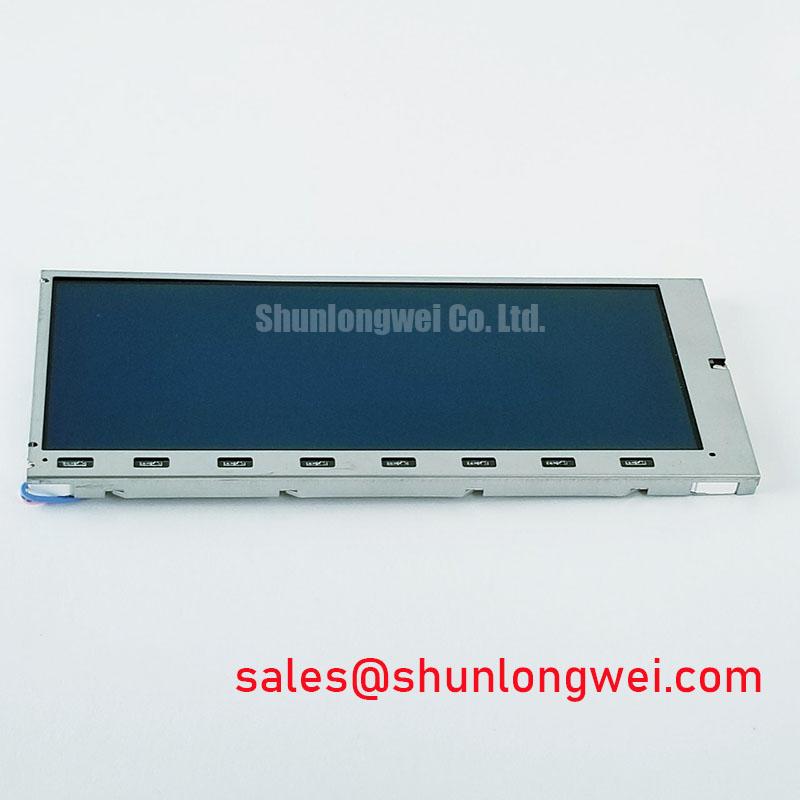
Missing rows, missing columns, or a band that changes when the bezel is pressed usually calls for a mechanical interface inspection before electronic replacement. The LM5Q32 is a compact 5.0-inch monochrome STN display with 320×240 resolution, making alignment across the active area and connector region important during installation.
Remove cabinet pressure gradually and inspect the display edge, connector seating, and retaining frame for displacement. A zebra strip must remain aligned with both the panel electrode pattern and the PCB contact land. Uneven bezel loading can produce localized open circuits, while excessive force may deform the interface or damage the glass edge. Compression values should be taken from the original mechanical drawing or assembly specification, not copied from a general LCD installation guide.
For heat-seal or bonded interconnects, look for lifted edges, contamination, and local separation rather than applying direct heat as a first response. Vibration can move a marginal interface enough to create intermittent lines, especially where the bezel has lost its original restraint. A controlled pressure test during live diagnosis can help locate an intermittent region, but it should be brief and performed with the enclosure and electrical safety conditions properly managed.
The monochrome STN optical path also depends on ambient lighting and the condition of the polarizer. Scratches, chemical haze, and heat-related discoloration can reduce reflective readability even when the pixel drive is correct. The aspect ratio of the 320×240 image should be preserved in the host rendering path; background information on standard display proportions is available from Display Aspect Ratio and Standard Screen Form Factors.
⚠️ Field Alert: Disconnect power before removing the parallel cable or touching the CCFL connector to prevent contact transients and high-voltage exposure.
Logic Power and Liquid Crystal Bias Power-Up Sequence Coordination
Power sequencing should be checked at the panel connector, not only at the machine power supply. The LM5Q32 logic supply is specified at 5.0V, while the liquid-crystal bias circuit belongs to the surrounding display system. Confirm that the host does not apply an unintended bias or control signal before the panel logic is ready.
For the 4-bit parallel bus, identify the actual roles of the controller signals from the original wiring documentation. Verify signal order, idle levels, pulse integrity, and timing relative to logic power with an oscilloscope.
A clean power-up test should capture the 5V rail, the panel bias rail, and the bus activity on the same time base. Look for control activity during an undervoltage interval, repeated resets, or a bias rail that rises before the logic supply has stabilized. These conditions can produce a blank display, unstable contrast, or partial image updates without proving that the LCD glass itself has failed.
When integrating the panel into a factory automation machine tool or HMI operator terminal, keep the parallel signal path away from the CCFL switching loop and confirm the grounding arrangement at the enclosure level. The ballast should be evaluated as a companion circuit, not replaced by an LED driver without a complete optical and electrical redesign. For related display power and interface planning, the LM24010Z may be reviewed as a complementary display solution reference.
For broader LCD selection, optical behavior, and system-level testing context, consult The Ultimate Guide to Industrial TFT LCD Technology. Manufacturer information can also be cross-checked through the Sharp Display Solutions Official Portal.