
Content last revised on September 23, 2026
Incoming Inspection Before Panel Installation
Measure the logic supply at the display power pins with the panel disconnected, then inspect the bezel, flexible connectors, and visible cell area under controlled illumination before applying power. For Sharp LQ123K1LG03, the listed logic supply specification is 3.3 V / 5.0 V ±0.5 V. The system integrator should verify the required supply rail from the original panel documentation and host equipment before connection.
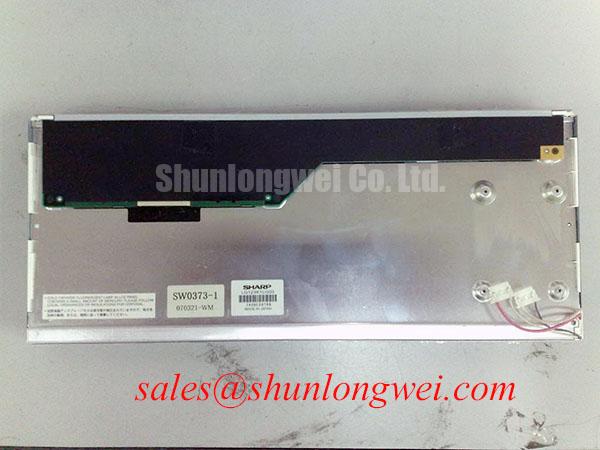
A first inspection should record the panel identification, connector orientation, cable condition, and any marks around the perimeter. Do not rely on a successful power-up alone as evidence of compatibility. A panel can illuminate while receiving an incorrect logic rail, an unsuitable timing format, or a mechanically stressed mounting load. Compare the replacement unit with the removed display and confirm that the host controller, cable assembly, backlight driver, and mounting aperture use the same electrical and mechanical arrangements.
With the display unpowered, use a digital multimeter to check for an unexpected low-resistance condition between the logic supply and return pins. This is an incoming QA screening step rather than a pass or fail diagnosis by itself. If the reading is unusual, inspect the cable orientation, connector latch, adapter board, and host-side protection components before energizing the panel. Once power is applied, use a full-screen white, black, red, green, and blue test pattern to expose pixels or areas that require further evaluation.
| Parameter | Classification | Verification Method | Possible Out-of-Spec Indication |
|---|---|---|---|
| Logic supply voltage | 3.3 V / 5.0 V ±0.5 V, Official Datasheet Specification | Digital multimeter measurement at the logic power pins | White screen, logic failure, or driver IC latch-up |
| Differential line impedance | 100 Ω ±10%, Design Consideration | TDR verification of the differential trace or cable path | Pixel jitter, horizontal sparkle noise, or increased EMI sensitivity |
| Chassis screw torque | 0.35–0.45 N·m, Design Consideration for M3 hardware | Calibrated digital torque screwdriver | Perimeter optical mura or mechanical cell stress |
| Backlight lifetime | More than 50,000 hours typical, Official Datasheet Specification | Photometer measurement against the initial luminance record | Dim image or visible spectral change during service |
Flush Mounting, Bezel Pressure, and Cable Retention
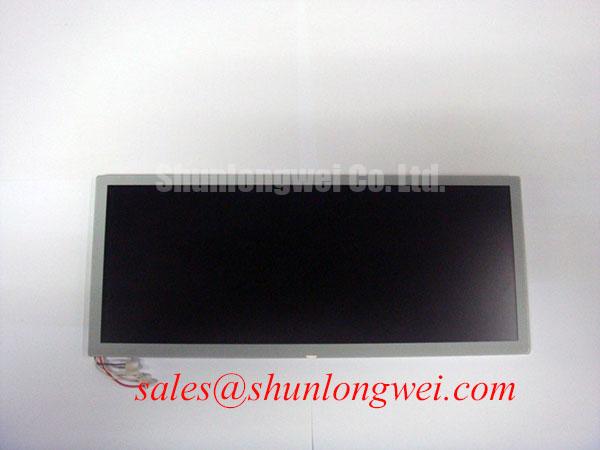
The LQ123K1LG03 should be evaluated as a display assembly rather than as a loose optical surface. In a flush-mount open-frame installation, the bezel opening must support the panel without forcing the active area against the enclosure. Check the aperture for burrs, uneven seating surfaces, and local protrusions before placing the display. A perimeter gasket can help distribute enclosure contact, but its material, compression behavior, and environmental suitability must be established by the system designer; they are not specified here as properties of the Sharp panel.
Use a cross-pattern tightening sequence when securing the chassis. The stated 0.35–0.45 N·m value is a general design consideration for M3 fasteners, not an asserted manufacturer installation limit for every enclosure. The actual mounting method should be validated with the panel drawing and the host equipment structure. Excessive or uneven force can distort the perimeter and create dark-field nonuniformity, especially when the bezel is rigid or the enclosure changes shape during thermal cycling.
For heavy equipment telematics displays, designers should separate structural retention from cable retention. The FPC or FFC should not carry enclosure vibration, connector insertion force, or bending caused by a moving cover. Provide a controlled cable route with sufficient clearance for the latch and avoid folding directly at the connector exit. The bend radius, flex-cycle capability, and locking method must be confirmed from the original cable and connector documentation because these values are not provided in the available product parameters.
Before closing the enclosure, inspect that the cable is fully seated and parallel to the connector body. A partially engaged cable can produce intermittent image data, backlight operation without valid video, or a screen that changes when the enclosure is moved. After assembly, repeat the full-screen pattern test while gently monitoring the cable area for image disturbance. This is a practical mechanical screening method, not a substitute for formal vibration or shock qualification.
💡 Bench Tip: Use ESD protection and release the connector latch before removing the cable; never pull the flexible cable while it is still locked.
When comparing a same-size or same-resolution reference option, engineers can review LQ9D03B as a separate compatibility reference. It should not be treated as a drop-in replacement without checking connector assignment, timing, mounting geometry, supply requirements, and backlight control.
Cold-Start Evaluation, Static Images, and Thermal Mechanical Stress
Outdoor industrial cabinets and equipment cabs can expose an LCD to rapid changes in temperature. At low temperature, liquid-crystal response can become slower, so a moving graphic may show longer transitions or apparent smearing. This is a design consideration for the complete display system and should not be represented as a guaranteed operating-temperature range for LQ123K1LG03 unless the original Sharp documentation confirms that range.
For a cold-start evaluation, place the assembled display and its controller in the intended environmental condition, allow the complete assembly to stabilize, and then record the power-up sequence, first visible image, brightness behavior, and transition response. Compare the result with a room-temperature baseline using the same test image and controller timing. If the image appears delayed or unstable, inspect the supply ramp, reset behavior, video clock, data enable timing, and backlight driver startup rather than assigning the symptom to the LCD cell alone.
The host controller should define a controlled power sequence. Verify that the logic rail reaches the required range before the video interface is enabled, and confirm that the backlight driver does not apply an unsuitable electrical condition during panel initialization. The exact delay and reset timing must come from the panel documentation and controller design. They should be validated with an oscilloscope at the panel connector during both startup and shutdown, particularly when the field symptom is a white screen, residual image, or brief flash.
Industrial HMI equipment may display fixed menus, gauges, or camera overlays for long periods. A static image can expose uneven aging or temporary image retention depending on the panel technology, drive conditions, temperature, and operating pattern. A practical design consideration is to use controlled screen changes, moderate brightness settings, and a service test pattern when the application permits. These measures should be verified on the actual assembly and must not be presented as a guaranteed burn-in prevention specification for this model.
Mechanical stress should also be checked after thermal cycling. Inspect the bezel seating, fastener locations, gasket contact, and FPC exit after the chamber test. Look for changes in dark-field uniformity, edge brightness, image flicker, or intermittent data. If optical mura appears after assembly, loosen the enclosure hardware in a controlled service test and compare the panel response, while observing the stated engineering torque range. Do not infer an internal material failure without component-level evidence.
For long-term industrial HMI planning, the broader Industrial Display & HMI Solutions resource provides context for enclosure, environmental, and service considerations. The page does not replace the LQ123K1LG03 documentation or the qualification plan for the finished equipment.
Signal Integrity, Shielding, and Backlight Drive Verification
Pixel jitter and horizontal noise bands should be investigated through the complete signal path, especially when the display is installed near variable-frequency motor drives or other high-current switching equipment. A 100 Ω ±10% differential line impedance is a design consideration for the differential interface path. Confirm the actual host board, cable, connector, and panel-side routing with a suitable TDR or signal-integrity method. This value should not be interpreted as confirmation of a particular connector pinout or interface type when the original panel documentation has not been reviewed.
Keep differential pairs routed together and avoid unnecessary changes in reference plane or cable geometry. Shield termination, chassis bonding, and connector backshell construction should be evaluated as an enclosure-level design. A 360-degree shield connection may be appropriate for a high-noise cabinet, but its effectiveness depends on the cable construction, grounding architecture, common-mode current path, and safety requirements. The display itself cannot independently establish compliance with CISPR, EN 55011, or another complete-equipment EMC standard.
Common-mode ferrite components can be evaluated when conducted or radiated noise is coupled into the display cable. Their impedance profile, current rating, placement, and effect on the differential waveform should be measured on the actual assembly. Adding a ferrite without checking the eye opening, common-mode voltage, and clock quality can exchange one problem for another. Use a known-good signal path and an oscilloscope to compare the differential waveform, edge behavior, and displayed image under the same motor-drive operating condition.
Backlight behavior requires the same separation between confirmed specification and system assumption. The listed backlight lifetime is more than 50,000 hours typical, measured as a typical service expectation to the point where luminance remains above 50 percent of the initial value. This is an Official Datasheet Specification as supplied for the product parameters, not a prediction of field life under every temperature, current, duty cycle, contamination level, or enclosure condition. Record initial luminance with a photometer so later service measurements have a traceable reference.
The available product information does not confirm whether a particular installation uses a CCFL inverter, a WLED constant-current driver, a specified PWM ratio, or a defined ignition voltage. The system integrator should verify the backlight architecture from the original panel documentation and the host driver label. Do not substitute a CCFL high-voltage assumption or a 1000:1 PWM claim for confirmed LQ123K1LG03 data. If the host uses LED current regulation, evaluate current ripple, startup overshoot, dimming frequency, audible behavior, and thermal rise at the complete assembly level.
For image quality screening, run uniform white and gray fields at the intended brightness settings, then inspect the display from the normal viewing position and at defined off-axis angles. Record uneven luminance, color shift, flicker, and noise bands separately. A dim region may involve the optical assembly, driver current, cable seating, or supply stability, so the repair record should retain measurements rather than assigning one cause from appearance alone.
1