

Content last revised on September 13, 2026
AA121SL01 Product Identification and Incoming Inspection
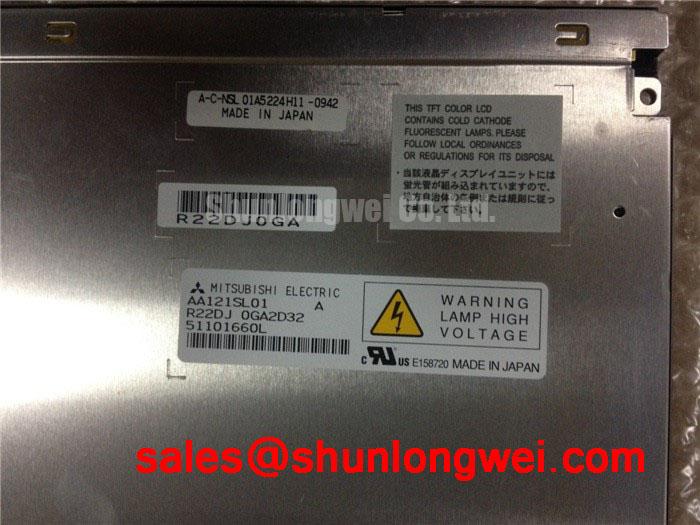
Begin incoming inspection of the AA121SL01 by checking the TFT LCD display module enclosure, connector condition, and mating-cable alignment under bright, even illumination before it is connected to a host controller. Mitsubishi Electric identifies this unit as an Industrial Grade LCD/HMI Panel in a TFT LCD Display Module enclosure. The available official factory information confirms the product category and manufacturer; the replacement engineer should obtain the original equipment documentation before applying power, assigning connector pins, or selecting a power sequence.
The AA121SL01 should be evaluated as a display assembly within its original equipment context. For a high voltage substation protection terminal or SCADA dispatch console, a panel replacement decision depends on the complete interface definition, mechanical fit, optical condition, controller timing, and backlight arrangement used by the existing terminal. A matching model designation alone does not establish compatibility with a different display cable, controller board, or enclosure.
| Official Factory Item | Specified Information |
|---|---|
| Model | AA121SL01 |
| Manufacturer | Mitsubishi Electric |
| Product category | Industrial Grade LCD/HMI Panel |
| Enclosure | TFT LCD Display Module |
| Specification status | Category and manufacturer identified in available factory information |
Power Sequencing and Interface Verification
Before connecting the AA121SL01 to a protection relay terminal or SCADA display controller, compare the original panel documentation with the host board documentation. Verify the required logic supply, connector pinout, signal standard, polarity assignments, display enable behavior, and required startup sequence. The available factory information supplied for this model does not establish a logic voltage, a rise time, a differential impedance target, or a JEIDA or VESA mapping. Those items must be confirmed from the original panel documentation and the equipment schematic rather than inferred from the product category.
As a Design Consideration, power sequencing deserves particular attention whenever a replacement screen remains dark, produces unstable imagery, or shows partial image artifacts after installation. The controller can apply data before the panel is ready, or the panel can receive an incomplete supply sequence. Capture the relevant rails and display control signals with suitable measurement equipment, then compare them with a known good system where one is available. Check that the panel cable is fully seated, level in its connector, and locked according to the connector design before investigating controller timing.
Signal routing should also be assessed at the equipment level. Differential data routing, source clock behavior, cable construction, grounding, and connector retention are determined by the terminal controller and its original display interface. A split image, intermittent lines, or loss of synchronization can arise from several conditions, including a damaged cable, poor connector engagement, an incorrect interface mapping, or a host-side signal problem. Verify the observed waveform against the known good signal path instead of assigning one cause from the visible symptom.
💡 Bench Tip: Disconnect system power, use ESD protection, and keep the display cable perfectly level while engaging and locking the connector to avoid stressing the contact area.
For a unit being assessed alongside another Mitsubishi Electric panel, AA104VC01 can be reviewed as a separate model, but its mechanical dimensions, signal definition, optical behavior, and host compatibility must each be verified independently. Cross model comparison is useful for documenting alternatives; it is not evidence of direct interchangeability.
Thermal and Mechanical Inspection under Continuous Operation
Inspect the AA121SL01 front surface and visible display area with the panel unpowered before installation. Look for pressure marks, localized discoloration, edge distortion, trapped contamination, or areas that appear optically uneven under broad illumination. These observations help establish the incoming condition of the TFT LCD display module before the host equipment is energized. They do not, by themselves, identify the internal cause of an optical defect.
During continuous operation, the panel temperature is influenced by the cabinet layout, controller electronics, display mounting method, airflow, nearby power devices, and ambient conditions. The factory information provided for AA121SL01 does not specify its thermal operating range, backlight technology, light output, optical films, or lifetime rating. It would therefore be inaccurate to attribute a particular thermal mechanism, backlight life figure, or internal optical material to this model without the original manufacturer documentation.
As a Design Consideration, the integrator should avoid concentrating mechanical loading along a narrow edge of the active display area. Confirm that the enclosure supports the module at the intended mounting features and that fastening hardware does not bend the frame or apply uneven pressure through the front bezel. After installation, run the original terminal through its intended display brightness and duty conditions while observing the full screen for nonuniform patches, intermittent illumination, or image changes that correlate with cabinet temperature.
For a substation console, a useful acceptance record includes photographs of a full white screen, a full black screen, and representative color fields after the cabinet has reached its normal operating condition. This documents pixel behavior, backlight uniformity, and visible edge effects at the time of service. If image degradation appears only after the terminal warms, inspect the entire display assembly path, including power delivery, controller behavior, mounting stress, and the equipment cooling arrangement.
Clock jitter margin, data hold time, and transmitter performance are host interface characteristics that require verification from the equipment design. Where a panel produces stable imagery on one controller and unstable imagery on another, compare the two controller outputs and cable paths under equivalent conditions. Avoid assigning a display panel specification to those measurements unless it appears in the official AA121SL01 documentation.
Investigating Acoustic Noise, Brightness Variation, and EMI
When a display assembly produces audible noise or visible brightness fluctuation, begin with a controlled observation. Determine whether the sound follows screen brightness adjustment, whether it changes with host power state, and whether the panel image changes at the same time. The AA121SL01 factory information available here does not state its illumination architecture, dimming method, operating frequency, high voltage requirements, or electromagnetic emissions performance. A particular PWM frequency, CCFL ignition voltage, LED drive method, or lifetime figure must not be assumed for this model.
As a Design Consideration, isolate the observation between the display module, its cable, the host controller, and any separate power conversion circuitry used by the original equipment. Audible behavior can originate in several locations, while visible instability can be related to supply regulation, control signaling, cable integrity, or environmental coupling. The maintenance team should review the original wiring diagram, then measure the appropriate points using equipment suited to the voltage and signal environment.
EMI compliance belongs to the finished industrial terminal, including its enclosure, power supply, grounding arrangement, cable routing, and attached devices. A display module cannot be represented as independently compliant with a complete system emission standard. When a SCADA dispatch console is returned to service, verify the repaired terminal according to the site’s equipment procedures and applicable system requirements. Route display cabling as the original design intended, maintain connector retention, and avoid unapproved changes to chassis bonding or shielding arrangements.
Visible flicker should be evaluated with a static test image and the same brightness control settings used in service. If the observed behavior changes after substituting a known good controller or cable, record that comparison before deciding which assembly needs further attention. This approach produces a more useful repair record than treating a single display symptom as proof of one internal failure mechanism.
Storage, Condensation, and Environmental Handling
Before storing or fitting the AA121SL01, inspect the protective packing, display surface, enclosure edges, and connector area. Keep the module protected from contamination, unnecessary flexing, condensation exposure, and uncontrolled handling. The available official factory data does not provide storage humidity limits, temperature limits, thermal cycle limits, response time, contrast ratio, sunlight readability, or coating details. These values must be taken from original panel documentation if the equipment environment requires them.
As a Design Consideration, allow a panel moved from a cold or humid environment to reach a stable, dry condition before it is connected to the terminal. Condensation risk depends on the actual transport conditions, the cabinet environment, and the equipment’s handling procedure. If low temperature operation is relevant, test the restored terminal in conditions approved for the complete equipment and observe image update behavior, brightness consistency, and interface stability. Do not translate a slower observed image response directly into a panel defect without also checking the controller, supply, and signal path.
For an industrial HMI used in a protection or dispatch environment, evaluate the installed display as part of the sealed equipment assembly. Confirm bezel contact, cable strain relief, enclosure closure, and the condition of any original gaskets or retention features. These checks help prevent mechanical stress and environmental exposure from being introduced during service. The system integrator should determine the final acceptance conditions from the original equipment requirements.
For practical reference on industrial panel selection, handling, interfaces, and common evaluation points, consult The Ultimate Guide to Industrial TFT LCD Technology. Apply those general practices only after reconciling them with the AA121SL01 documentation and the specific host terminal design.