Content last revised on September 13, 2026
Full-Screen Display Inspection: Pixel Defects and Background Uniformity Audit
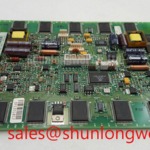
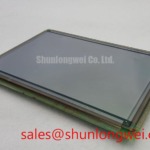
Start the incoming inspection with a stable, known-good controller path and full-screen test images appropriate for the Planar EL640.400-C3. Black, white, and gray fields can help reveal defective pixels, non-uniform luminance, edge shadowing, line artifacts, or localized contamination. Record findings with the panel powered in its intended orientation, because viewing angle and enclosure pressure can affect the visibility of some optical symptoms.
A flashlight inspection performed at an oblique angle can help separate an apparent display-surface or optical issue from a persistent image-line defect. If a dark field changes substantially when illuminated externally, the observation can point the investigation toward the display surface or optical stack. If a line persists with every test image and does not respond to controlled changes in brightness, the service engineer should continue with signal-path, interconnect, and panel-level assessment. Neither observation alone establishes a single root cause.
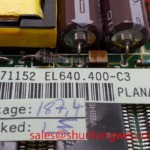
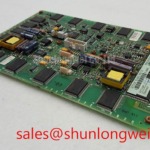
For the EL640.400-C3, verify that the host controller is presenting the correct interface type, signal mapping, timing relationship, and power sequence specified by the original equipment documentation. An image that is shifted, distorted, intermittently unstable, or blank may result from a format or timing mismatch rather than an intrinsic display defect. Engineers evaluating a replacement should compare the physical envelope, visible area, interface documentation, and host-controller compatibility rather than relying on model family similarity.
⚡ Safety Interlock Note: Disconnect power and allow the host equipment to discharge before inserting or removing the display cable.
In specialist visual terminals, including surgical-navigation or ultrasound-diagnostic display assemblies, panel suitability should be assessed against the complete equipment-level image chain and applicable regulatory documentation; the panel itself should not be represented as carrying the finished system’s approval status.
Managing Localized Thermal Gradients and Long-Term Display Uniformity
Localized heating near a narrow display edge can change the appearance of a dark field or a neutral image over time. This is a system-integration concern rather than an official performance claim for the EL640.400-C3. During enclosure review, examine whether nearby power devices, restricted airflow, or a compressed gasket concentrate heat in one region of the module.
Design Consideration: A chassis that distributes heat more evenly along the relevant display-edge region can reduce localized thermal stress. The mechanical arrangement should be validated on the finished equipment, using representative image conditions, enclosure conditions, and operating duty. Avoid assigning a display lifetime, luminance-change rate, or optical-material construction to this model unless these details are confirmed by its original manufacturer documentation.
Display intensity control also deserves a functional check. A visible shimmer in text, moving camera capture bands, or audible noise from surrounding electronics can arise from the control implementation, driver behavior, wiring, or mechanical coupling. The system integrator should verify the intended control method and its behavior in the actual host assembly. Do not assume the required control voltage, control frequency, or current rating from the panel model alone.
Where the display harness shares space with switching circuitry, engineers may assess conducted-noise suppression as part of the complete equipment design. General information on ferrite-bead high-frequency attenuation can assist with understanding the role of impedance at high frequencies, but component placement and effectiveness require measurement in the specific system.
For broader context on industrial display technology and integration terminology, consult The Ultimate Guide to Industrial TFT LCD Technology alongside the documentation for the installed controller and display assembly. TFT-LCD guidance may not apply directly to the electroluminescent EL640.400-C3.
Preventing Localized Display-Stack Compression on Dark Screen Fields
Inspect the display bezel, carrier frame, cable routing, and adjacent covers before attributing dark-field non-uniformity to the module itself. Uneven retention pressure can produce localized optical changes that become more noticeable on black, gray, or low-intensity images. Look for a bezel that bears on an active viewing region, warped support surfaces, trapped harnesses, missing cushions, or screw locations that pull the carrier unevenly.
Engineering Recommendation: Apply mounting force progressively and in a cross-pattern sequence when the host assembly uses multiple perimeter fasteners. The correct fastener type, tightening limit, thread engagement, standoff height, and compression condition must be determined from the equipment’s mechanical drawings and service procedure. A panel-specific torque value must not be inferred without an official Planar document or approved host-equipment specification.
After installation, re-run the same black, gray, white, and representative test fields used during the initial check. Compare the display before and after final enclosure closure. A new localized shadow after assembly may indicate that the integration stack requires review. It does not automatically prove a panel-level display failure.
Replacement evaluation should also account for the original unit’s connector location, mounting geometry, controller format, and display area. Engineers comparing a same-class option such as NL192108JC18-03ND should treat it as a separate compatibility assessment. Mechanical fit, electrical pin assignment, timing, optical behavior, and display-drive implementation must each be verified against the target equipment.
Thermal Cycling Effects on Display Materials and Seal Integrity
Thermal cycling can expose weaknesses in the display integration stack, including enclosure sealing, cable strain relief, mounting interfaces, and adhesive-backed perimeter features. For the EL640.400-C3, verify applicable operating and storage limits only from the original panel documentation. Do not apply a temperature range from another display family or from general industrial practice as an official rating for this model.
At low ambient temperature, display response and image appearance can differ from room-temperature observations. This is a condition for controlled evaluation, not a diagnosis. Compare the display with a known-good signal path, allow the equipment to reach its normal thermal state, and observe whether the effect follows the panel, the controller, the cable, or the enclosure condition. If a heater or temperature-management function exists in the equipment, confirm its control sequence from the system documentation before modifying the display assembly.
Perimeter seal condition should be checked visually for lifting, contamination, gaps, or evidence of mechanical interference. Cleaning agents, sealants, protective films, and replacement gaskets should be selected only when their compatibility with the host equipment and display assembly has been confirmed. Avoid placing unapproved materials against the viewing surface or display edge.
When a display system incorporates isolated switching functions elsewhere in its equipment architecture, understanding general solid-state relay operating principles may help technicians trace the system-level control path. The relay’s behavior, however, does not define the interface or operating requirements of the EL640.400-C3.