
Content last revised on October 12, 2026
Optical Luminance Degradation Curve & CCFL-to-LED Modernization Retrofit Pathways
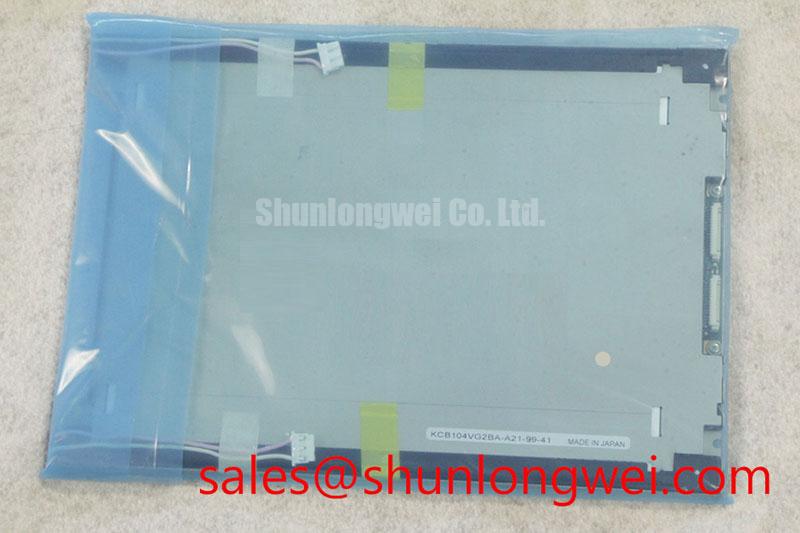
I compare the illuminated screen against a recorded reference under the same image, brightness command, viewing position, and ambient lighting before treating reduced brightness as a panel failure. For the Kyocera KCB104VG2BA-A01, that comparison should remain separate from assumptions about the installed backlight assembly. The maintenance record should identify the display, illumination hardware, and controller as distinct service items.
Design Consideration: A useful luminance trend records stabilized screen brightness alongside enclosure temperature and operating conditions. Changing the brightness command or measuring a cold display against a warmed reference can obscure the actual trend. Reduced illumination, altered contrast settings, a contaminated protective window, and uneven illumination can produce overlapping symptoms; inspect these separately before assigning the loss to the display module.
A CCFL-to-LED conversion is a system modification, not an established feature of this model. Where an existing assembly has a documented CCFL inverter, a retrofit assessment should address the replacement illumination geometry, driver supply, enable logic, dimming control, and mechanical fit. Inverter ignition requirements cannot be transferred to an LED driver. Likewise, constant-current regulation does not by itself establish useful life, flicker performance, or compatibility with the original brightness control.
For an evaluated LED conversion, observe current regulation and optical output throughout the intended dimming range. PWM performance depends on the driver, controller, pulse behavior, and measurement conditions; frequency alone does not establish flicker-free operation. Audible noise should be localized to the actual assembly rather than attributed automatically to the panel. The Kyocera industrial display technology resources provide manufacturer context, while the specific assembly documentation remains the basis for selecting its electrical and optical limits.
High-Nits Edge-Lit LED Rail Thermal Dissipation & PMMA Light Guide Plate Preservation
Map accessible enclosure and display-frame temperatures after thermal stabilization, then compare the results with the screen’s brightness uniformity. A warmer edge alongside a dim region warrants investigation, but does not establish the internal light-guide material or illumination arrangement of the KCB104VG2BA-A01. Neither a PMMA construction nor a high-brightness LED rail should be assigned to this model without supporting product documentation.
Design Consideration: Where a separately documented LED assembly uses an edge-mounted thermal path, preserve its intended contact surfaces and avoid obstructing heat transfer with displaced seals or cables. Additional heat spreading should be evaluated against enclosure airflow, mounting stress, and the assembly’s permissible temperatures. Electrical driver efficiency and optical efficacy are different quantities; assess input power, illumination output, and temperature together rather than interpreting lower supply current as proof of better illumination performance.
Backlight protection belongs to the installed driver architecture. During servicing, examine its documented open-load, short-circuit, and overvoltage responses, including any fault-status output and restart behavior. Avoid repeatedly cycling a driver into a suspected fault. Capture the supply, enable command, and fault indication together so that a controller shutdown is not mistaken for a failed light source.
Keep the image-data path separate from the illumination path in the service schematic. Interface voltage, connector mapping, clock requirements, and setup and hold margins must correspond to the actual panel interface; a driver change does not justify altering them. The NL8060BC31-41E is a separate display product for system-architecture comparison, not a backlight driver or an assumed companion module. General explanations of pixel addressing are available in the TFT LCD technology reference; they do not establish this model’s pinout.
Thermal Expansion Clearance Sizing across Heavy Industrial Metal Enclosure Cutouts
Check the bezel opening, mounting supports, and gasket contact before tightening the display into its enclosure. The frame should seat without being pulled into alignment by the fasteners. An opening that fits at room temperature can still impose stress when the enclosure and display frame expand differently during operation.
Design Consideration: Determine clearance from the documented module envelope, enclosure tolerances, material expansion, and operating temperature range. Distribute fastening loads progressively across the supported mounting points, using the assembly’s specified hardware and torque. A generic screw-size torque is not a substitute for the display mounting specification. Observe a uniform dark image before and after installation; a changed bright patch or edge shading can help identify installation-dependent stress without proving a particular internal defect.
Inspect the dust gasket for continuous contact, displaced sections, and compression that pushes against the viewing area. Sealing pressure should follow the enclosure design rather than being increased until every visible gap disappears. For temperature transitions, manage moisture through the enclosure’s approved environmental controls and allow condensation to clear before energizing equipment.
Maintenance Note: Periodically inspect cooling passages and gasket seating without pressing on the display’s active area.
When evaluating installation in a CNC operator panel or robot teach pendant, compare the complete display assembly rather than the model name alone. The TCG104SVLQAPNN-AN20 can be included in a procurement comparison, but dimensional fit, resolution, interface, illumination controls, and optical behavior require independent matching before it is treated as a replacement. Protective-window reflections and surface treatments should also be assessed under the equipment’s actual ambient lighting.
Single Vertical Hairline Defect & Sub-Pixel Column Driver Open-Circuit Localization
Display solid red, green, and blue fields from a known-good image source and record whether the vertical defect stays at the same screen position. Follow with dark and bright fields to distinguish a persistent pixel-column anomaly from illumination nonuniformity. Keep the source settings unchanged while comparing results.
Design Consideration: A fixed line can narrow the investigation toward the panel signal path, but it does not independently prove an open column driver or a fractured internal connection. With power isolated, inspect accessible connector seating and cable routing. Where the equipment permits, compare the original source and harness with a verified compatible test arrangement. Avoid flexing the panel or pressing its perimeter as a diagnostic shortcut.
For a dark screen, oblique external illumination can help reveal whether an image remains present. Treat that observation as evidence to investigate the illumination chain, not as confirmation that every image-processing stage is healthy. Check the backlight command and documented driver fault outputs alongside the displayed image. Brightness depreciation, service life, and MTBF describe different outcomes and should not be used interchangeably.
The industrial TFT LCD technology guide supports the distinction between optical, interface, and installation faults. Record the test pattern, thermal state, source configuration, and defect position in the repair report so the next technician can reproduce the observation before authorizing panel replacement.