
Content last revised on September 27, 2026
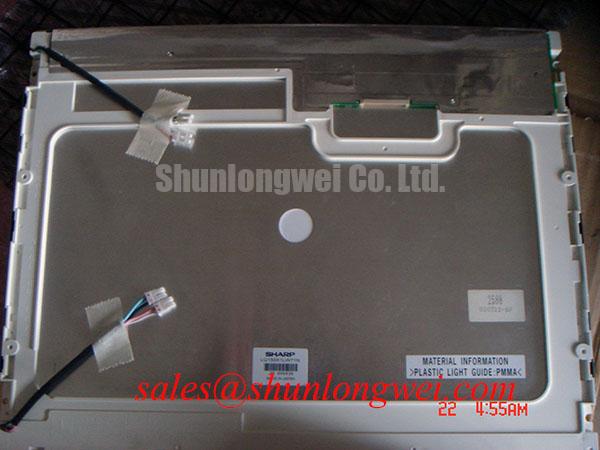
Sharp LQ150X1LG94 LCD Display Module
Begin a replacement assessment by isolating the display power and interface cables, then compare the installed panel identification with LQ150X1LG94 before applying power. This part is identified as a Sharp TFT LCD Display Module. Resolution, active-area dimensions, interface pin assignment, backlight configuration, supply voltage, and timing data should be confirmed against the original panel documentation before installation.
| Item | Product information |
|---|---|
| Model | LQ150X1LG94 |
| Manufacturer | Sharp |
| Product category | LCD Display Panel |
| Construction category | TFT-LCD Display Module |
This information supports an initial purchasing and compatibility review, but it does not replace the original Sharp documentation for electrical limits or mechanical drawings. A display with the same nominal diagonal size can still require a different connector orientation, timing configuration, backlight driver, mounting pattern, or image data format. Engineers servicing surgical navigation displays, ultrasound diagnostic consoles, and other high-precision imaging terminals should therefore treat the host system documentation as the controlling source for every unlisted parameter.
Eye-Diagram Voltage Margin and Differential Noise Floor Verification in High-Vibration Bays
For a replacement evaluation, inspect the complete signal path rather than testing the LCD module in isolation. Check the host controller, cable assembly, connector seating, shield termination, and panel-side interface for mechanical stress before measuring the video signal. The LQ150X1LG94 product identity alone does not confirm whether a particular system uses LVDS, TTL, or another display interface, so the system integrator should verify the interface type and pin mapping from the original panel documentation.
In equipment positioned near variable-frequency motor drives, servo amplifiers, or switching power supplies, common-mode interference can appear as intermittent horizontal bands, unstable pixels, or image disturbance that changes with motor speed. These symptoms do not establish a single root cause. Compare the display signal with a known-good path, observe the differential waveform using suitable probing methods when a differential interface is used, and check whether the disturbance is present at the controller output or only at the panel connector. This separation helps distinguish a source timing problem from cable coupling, grounding, or enclosure-level noise.
A 360-degree shield termination may be considered where the original system construction supports it, but the correct bonding method depends on the enclosure, cable design, grounding strategy, and applicable system EMC requirements. The panel itself should not be described as independently meeting complete equipment-level EMC certification. Designers should verify the effect of shield bonding during system testing while avoiding ground-current paths that could introduce additional noise into sensitive display electronics.
Ferrite suppression is also a system-level design consideration. Its impedance characteristic, location, and interaction with the cable can affect the differential waveform and common-mode response. Adding a ferrite without checking the eye diagram may alter signal quality rather than improve it. When evaluating the LQ150X1LG94 in a high-vibration bay, inspect connector retention and cable strain relief at the same time as electrical noise. Vibration can change contact pressure or cable position, producing intermittent behavior that is difficult to reproduce on a stationary bench.
Cold-temperature operation requires a separate review of the display timing and image response. Liquid-crystal response behavior can change as ambient temperature falls, and the resulting image transition may appear slower even when the controller timing remains stable. An operating-temperature range, gray-to-gray response specification, and any heater requirement for this model should be checked in the original documentation. If the original equipment includes a heater strip or controlled warm-up sequence, preserve that system function and verify the panel response across the actual enclosure temperature range rather than assuming a generic LCD temperature characteristic.
Thermal Expansion Clearance Sizing across Heavy Industrial Metal Enclosure Cutouts
Mechanical replacement work should start with a dimensional comparison of the removed display and the LQ150X1LG94 assembly. Record the visible aperture, bezel contact surfaces, connector clearance, cable bend space, and fastening locations. The outer envelope, active-area drawing, hole pattern, and fastener specification must be checked against the applicable Sharp mechanical drawing or the original equipment service documentation.
Metal enclosures and display assemblies can expand differently during temperature changes. A rigid cutout that appears acceptable at room temperature may place uneven pressure on the bezel or panel when the chassis heats or cools. The practical design objective is to maintain stable support without transferring enclosure distortion into the display assembly. Clearance should be established from the documented mechanical envelope and then checked with the enclosure at its expected temperature extremes.
Fasteners should be tightened in a cross-pattern only when the original mounting design calls for that method. The correct torque is determined by the fastener size, insert type, bracket material, washer arrangement, and panel manufacturer’s instructions. A general mounting value must not be presented as an LQ150X1LG94 specification. During installation, confirm that the bezel is supported evenly and that the display is not being used to correct a distorted metal opening.
Localized pressure may produce visible optical non-uniformity, but a dark region or uneven field does not prove that mechanical compression is the cause. Inspect the mounting interface, compare the symptom before and after loosening the enclosure support under controlled conditions, and check the signal source separately. Optical observations should be made with a stable test image and consistent ambient lighting. Strong reflections from a protective window can otherwise be mistaken for panel mura or backlight non-uniformity.
For potential use in high-precision surgical and ultrasound diagnostic display equipment, the replacement review should include the front-window arrangement, viewing angle requirements, surface reflection behavior, and operator-glove interaction. The information presented here does not confirm anti-glare, anti-reflection, projected-capacitive touch, resistive touch, or glove and wet-touch performance for this model. Those features should be verified from the panel and installed system specifications rather than inferred from the TFT-LCD category.
When a same-size or same-resolution alternative is being considered, compare the connector location, active area, timing requirements, optical stack, backlight control, and enclosure interface as separate engineering checkpoints. The LMS700KF01-001 can be reviewed as a separate display option, but compatibility should be established from documented specifications rather than from model family, diagonal size, or appearance alone.
Diffuser Film and Prism Sheet Thermal Buckling Prevention under Continuous Full-Duty Operation
Continuous full-duty operation calls for an evaluation of heat distribution around the display assembly and the surrounding enclosure. Do not assume that the presence of a TFT-LCD module confirms a particular LED backlight construction, diffuser film, prism sheet, light guide material, or rated backlight lifetime. Those details should be checked in the applicable LQ150X1LG94 documentation.
The correct first measurement is the temperature map of the assembled display under the real image load, brightness setting, enclosure airflow, and mounting condition. Measure the panel surface, rear housing, cable region, and adjacent metalwork after the system reaches a stable condition. If a localized hot area appears, inspect the heat path and airflow before adding a rail or spreader. An aluminum heat spreader may be a useful design consideration, but its contact pressure, electrical isolation, thermal expansion, and effect on the enclosure must be evaluated by the system designer.
Optical films should not be clamped, folded, or preloaded as a means of controlling thermal movement unless the original mechanical design specifies that arrangement. A change in frame pressure can alter uniformity or create stress-related artifacts. If the display uses a separate backlight driver, verify the driver’s current regulation, dimming method, enable behavior, and fault response from the system documentation. The LQ150X1LG94 identity does not independently confirm a backlight current rating, dimming interface, L70 value, B50 value, or continuous operating-life figure.
Image quality testing should include full-white, mid-gray, black, and moving-pattern screens. These patterns help separate backlight non-uniformity from video-data errors, timing instability, and enclosure reflections. Test the panel at the brightness levels used by the equipment rather than judging thermal behavior only at a low laboratory setting. If the display is installed behind a protective window, evaluate the complete optical stack because the window, gasket, air gap, and surface treatment can change both reflection and heat retention.
Digital timing should be checked at the transmitter and at the panel connector using the interface information confirmed for the specific host system. LVDS clock quality, pair routing, return-current continuity, and connector integrity are relevant when that interface is documented; they should not be assumed solely from the product category. JEIDA and VESA data mapping are also system parameters. A mapping mismatch can produce incorrect colors or channel placement, while a timing mismatch can produce unstable or incomplete images. Verify the mapping against the original controller configuration before changing firmware or cable wiring.
💡 Pro Tip: Disconnect display cables only after system power has been removed and the equipment procedure confirms that stored energy has discharged.
Logic Supply Voltage Sequencing and Driver IC Protection Review
Before connecting the LQ150X1LG94 to a replacement controller, identify the documented logic supply, backlight supply, enable signals, and power-on sequence. Do not assume that a generic LCD controller voltage is suitable for this Sharp module. The system integrator should verify the required supply voltage from the original panel documentation and confirm the connector pinout before applying power.
Power sequencing is especially important when the host controller, display logic, and backlight driver start at different times. Review the original waveform relationships for supply rise, reset release, display enable, and backlight enable where applicable. Any specified rise-time window, reset requirement, or sequencing value for this model should be checked in the original documentation. Any replacement controller should therefore be tested against the documented requirements rather than configured from a generic LCD profile.
If the system uses a differential display link, route the pairs according to the controller and cable documentation, maintain a continuous return path, and avoid unnecessary stubs or abrupt reference-plane changes. Characteristic impedance is a controlled interconnect property, not a guaranteed property of the panel model alone. The final routing and termination arrangement should be verified by the system engineer with the selected transmitter, cable, connector, and enclosure.
When the panel remains blank, begin with objective checks: confirm the supply at the correct connector pins, verify enable-state logic, check the presence of the source clock and data, and compare the signal path with a known-good assembly. A blank image can involve power sequencing, cable mapping, controller configuration, backlight operation, or panel condition; it should not be assigned to one cause without measurement. For a service replacement, retain the original cable orientation and document every connection before testing.
For medical display equipment such as surgical navigation and ultrasound diagnostic terminals, system-level verification should also address image integrity, operator viewing conditions, enclosure grounding, cleaning compatibility, and the required equipment compliance process. The Sharp LQ150X1LG94 should be assessed as a display module within that system, not as an independent certification of the finished device. Practical environmental and integration reference material is available through Industrial Display & HMI Solutions.
Procurement teams should provide the seller with the installed equipment model, panel label information, connector photographs, and any available controller documentation when requesting a replacement review. Those records allow the physical interface and electrical requirements to be checked before dispatch without treating unlisted characteristics as confirmed specifications.