Content last revised on October 6, 2026
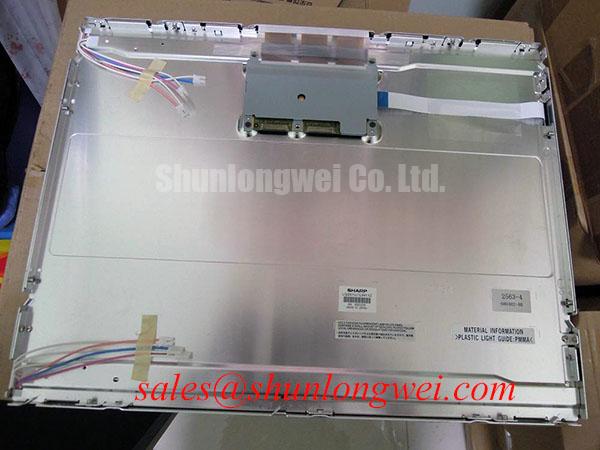
Sharp LQ201U1LW32 Industrial LCD Panel
Begin replacement work by isolating the display assembly, recording the original panel markings, and checking the connector, mounting points, and visible glass condition before applying power to the Sharp LQ201U1LW32. This part is identified in the supplied product data as an Industrial Grade LCD/HMI Panel with a TFT LCD Display Module construction.
The LQ201U1LW32 should be evaluated as a display module replacement for equipment such as an industrial automation CNC operator panel or a robot teach pendant. Compatibility must be established from the original equipment documentation and the removed panel, since the available data does not confirm every electrical interface, backlight arrangement, optical value, timing requirement, or mechanical dimension.
| Parameter | Specified Information |
|---|---|
| Model | LQ201U1LW32 |
| Manufacturer | Sharp |
| Product category | Industrial Grade LCD/HMI Panel |
| Display construction | TFT LCD Display Module |
| Potential equipment evaluation | CNC operator panels and robot teach pendants, subject to system compatibility checks |
Supply voltage, signal format, connector pin assignment, backlight drive method, luminance, contrast ratio, response time, viewing angle, resolution, active area, and operating temperature range are not confirmed in the supplied hardware parameter set. The system integrator should verify these values from the original Sharp panel documentation or the equipment manufacturer’s service documentation rather than assuming a standard LCD interface.
Viewing Cone Evaluation for Multi Angle Consoles
Operators often view a CNC control panel or robot teach pendant from an offset position rather than directly in front of the glass. For that reason, the original panel’s viewing behavior should be compared with the replacement under the actual enclosure lighting and operator posture. The supplied data for the LQ201U1LW32 confirms the TFT LCD module category, but it does not confirm a Super IPS structure, MVA construction, or a symmetric 85°/85°/85°/85° viewing specification.
A design consideration during evaluation is grayscale stability across the usable viewing cone. TN panels can show tonal inversion or rapid contrast changes when viewed from above, below, or from the side. IPS and MVA families can behave differently, but the panel technology must be verified from the applicable datasheet rather than inferred from the model number. A practical bench comparison uses the same image, identical display settings, and the same viewing positions used by the machine operator.
Ambient illumination also affects the assessment. An anti glare surface can reduce reflected overhead lighting, yet surface treatment may alter perceived sharpness and black level. Inspect the display with the cabinet door open and closed, then repeat the check under the plant’s normal lighting. A uniform gray image, white image, and dark image are useful for identifying reflections, uneven illumination, and visible area differences without assigning an unsupported cause to a particular symptom.
LED backlight decay and a 50,000 hour half brightness point should be treated as verification items, not as official specifications for this model. The supplied data does not confirm the backlight source, constant current driver conditions, test temperature, or lifetime curve. If the installed panel is used for long shifts, obtain the correct backlight specification and compare its test conditions with the machine duty cycle.
When an alternative panel is being reviewed, LM190E08 TLG6 can be examined as a separate display option. It should not be treated as a direct substitute until the engineer confirms active area, resolution, connector arrangement, mounting geometry, optical performance, and control timing against the existing assembly.
Suppressing Pixel Jitter and Horizontal White Lines Near Motor Drives
Pixel jitter and horizontal bright bands appearing near variable frequency motor drives require an installation level investigation. The display module alone cannot be declared the source of electromagnetic interference, and the supplied LQ201U1LW32 data does not include an EMC certification claim or a confirmed cable shield specification. Check whether the disturbance changes with motor speed, switching state, cabinet door position, cable routing, or display brightness before changing components.
A useful design consideration is to keep the display signal path separated from high energy motor conductors and to preserve the intended shield termination of the original cable assembly. A shielded FFC or LVDS cable should be inspected for crushed sections, incomplete contact with the chassis reference, loose connector locks, and routing alongside drive output wiring. Grounding changes should follow the equipment wiring design; adding an unplanned connection can create a ground loop rather than remove interference.
Common mode ferrite suppression may be considered where the system engineer has identified conducted or radiated noise through measurement. The appropriate component, placement, and impedance behavior depend on the cable construction and signal bandwidth. They should be selected after checking the known good signal path with suitable test equipment. A display replacement should not be used as proof that a cabinet has met CISPR, EN 55011, or another complete equipment EMC requirement.
Inspect the display connector with power removed and verify that the latch is fully engaged before reconnecting the assembly. Confirm the original power sequencing as well. If the panel image appears white, unstable, or absent after service, check the host controller output, enable signals, supply rails, connector orientation, and backlight control path in an orderly manner. The available product data does not define the LQ201U1LW32 supply voltage or signal timing, so the original documentation remains the controlling reference.
The same interface discipline applies when reviewing a related display solution such as LMS700KF01 001. This link represents a separate component and does not establish electrical or mechanical interchangeability with the Sharp LQ201U1LW32.
Optical Luminance Degradation and Backlight Retrofit Evaluation
Before planning a backlight retrofit, record how the original panel is illuminated and how its brightness is controlled. The supplied specification identifies the LQ201U1LW32 as a TFT LCD Display Module, but it does not confirm whether the installed assembly uses CCFL, LED, a particular driver topology, or a defined dimming range. The system integrator should verify the required supply voltage and backlight method from the original panel documentation.
CCFL systems can require a high voltage ignition stage, while LED systems normally require a driver matched to the LED string characteristics. Claims about CCFL ignition voltage, PWM dimming range, and backlight lifetime must not be assigned to this Sharp model without a model specific source. These values vary with lamp construction, driver design, thermal conditions, optical assembly, and the manufacturer’s lifetime test method.
For a CNC operator panel, compare brightness uniformity at the center and edges, observe the display after cold cabinet startup, and check whether the host control changes brightness during operation. A visible delay, uneven illumination, or acoustic noise may involve the driver, wiring, enclosure temperature, or the panel assembly. Measure the actual backlight control waveform only after confirming the connector pinout and safe probing method.
Cold environments deserve particular attention. A machine stored below its normal operating condition may show slower optical stabilization or condensation risk during warm up. The correct response time compensation, heater strategy, and enclosure ventilation are system decisions that require the actual panel temperature range and equipment environmental specification. Do not infer a wide temperature rating from the industrial category alone.
For long periods of static HMI display, configure the host interface to use suitable screen rotation, dimming, or idle content where the machine safety concept permits it. This is a system design consideration rather than a guaranteed protection feature of the LQ201U1LW32. Confirm that any screen saver or brightness change does not interfere with alarms, operator prompts, or required safety information.
Panel selection should also account for the bezel seal, gasket compression, and cabinet aperture. The sealing arrangement must prevent dust and moisture from entering the operator interface without transferring excessive local force into the glass. Fasteners should be tightened progressively and evenly according to the equipment manufacturer’s service instructions. Maintenance Note: inspect the cabinet airflow path and display gasket condition during scheduled service, and remove power before disconnecting the panel cable.
Preventing Mechanical Stress and Glass Substrate Damage
Handle the LQ201U1LW32 by its frame rather than pressing the visible glass while positioning it in the bezel. The supplied data confirms the TFT LCD module form, but it does not provide a glass thickness, driver bump construction, flex cable bend radius, connector cycle rating, vibration rating, or shock rating. Those characteristics must be obtained from the applicable mechanical and electrical drawings.
A practical installation check begins with the cabinet opening. Confirm that the panel rests evenly on its intended support surfaces and that no burr, cable, spacer, or misplaced gasket presses against the active area. Uneven enclosure loading can produce local optical nonuniformity or place stress on the glass. If the panel is installed in a vibrating machine, the mounting structure should manage vibration without allowing the display frame to twist relative to the cabinet.
Flexible cables require a smooth routing path with no sharp fold at the connector exit. The connector lock should be closed only after the cable is fully aligned, and the cable should not carry the weight of the panel assembly. Repeated door movement, pendant rotation, or service access can fatigue a flex connection even when the glass itself remains undamaged. Establish the bend path from the equipment’s actual movement rather than applying a generic bend value that is not confirmed for this model.
A three stage color check is useful after installation. Display a primary red field, then green, then blue, while inspecting the full active image for missing regions, intermittent lines, uneven brightness, and color contamination. Follow this with a dark screen and a text screen at normal operator brightness. A flashlight held obliquely can help distinguish a local shadow in the backlight from a line or region that follows the image data, but this observation is only a diagnostic clue. Verify the result through the signal path and, where possible, by comparison with a known good assembly.
Do not assign a horizontal white line automatically to a glass driver fault. It may also involve signal integrity, connector contact, controller timing, power sequencing, or mechanical loading. Likewise, a dark patch may relate to the optical assembly, backlight, contamination, or a viewing reflection. Record whether the defect changes when the cabinet is stationary, when the cable is gently supported without force, and when the source image changes. Avoid pressing the glass or flex area during this inspection.
A PWM range of 200 Hz to 1 kHz and duty cycle linearity are not confirmed specifications for the LQ201U1LW32. If a replacement backlight driver is introduced, the system engineer should verify the driver’s frequency, dimming response, audible behavior, optical ripple, and controller compatibility through testing. Any power on or power off delay intended to prevent a white screen or residual image must likewise follow the host system timing documentation.
For broader service reference, The Ultimate Guide to Industrial TFT LCD Technology can support general TFT display evaluation. It does not replace the Sharp model documentation or confirm unlisted parameters for the LQ201U1LW32.