Content last revised on September 14, 2026
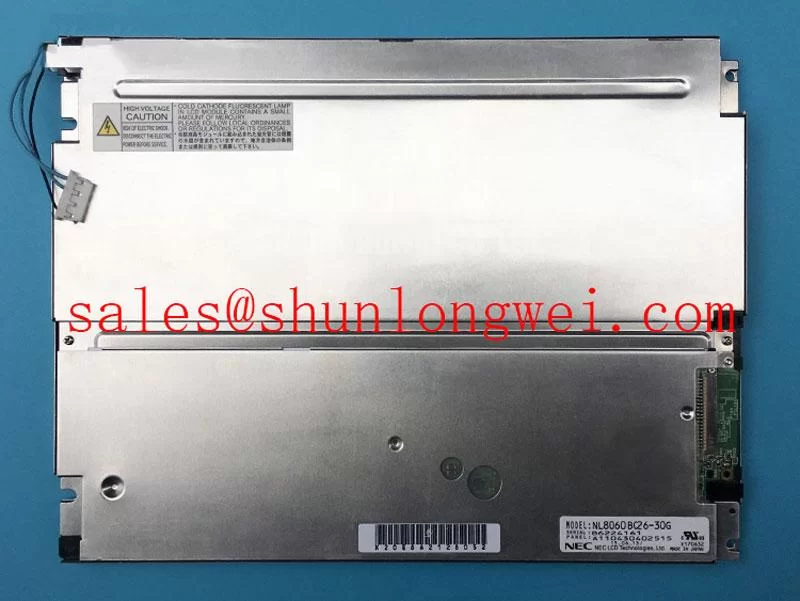
NEC NL8060BC26-35BA TFT-LCD Industrial HMI Display Module
Begin a replacement assessment by checking the installed panel label, inspecting the TFT-LCD module for cracked glass or frame distortion, and comparing the original connector arrangement with the proposed NEC NL8060BC26-35BA before applying power.
This product is identified as an Industrial Grade LCD/HMI Panel supplied as a TFT-LCD Display Module. The available product information identifies the NEC manufacturer, the module category, and the model number. It does not, in the supplied specification context, confirm a complete electrical interface table, display resolution, active-area dimensions, backlight architecture, operating temperature range, or connector pinout. Those values must be verified against the original panel documentation and the equipment service manual rather than inferred from the model number.
| Parameter | Available specification status |
|---|---|
| Model | NL8060BC26-35BA |
| Manufacturer | NEC |
| Product category | Industrial Grade LCD/HMI Panel |
| Module construction | TFT-LCD Display Module |
| Specification status | Manufacturer and model identified; detailed specifications require verification |
| Interface voltage, pinout, and timing | Verify from the original panel documentation |
| Backlight type and electrical ratings | Verify from the original panel documentation |
Flashlight Dark-Shadow Optical Diagnostic to Isolate Logic vs. Backlight Failure Modes
For a failed display in a substation protection terminal or SCADA dispatch console, start with a controlled visual inspection before removing the module from its bezel. Confirm whether the panel produces any changing image, cursor movement, alarm screen, or diagnostic pattern. A completely dark screen does not by itself establish a backlight failure because the display logic, video path, panel bias circuitry, and illumination system can produce similar field symptoms.
A practical bench sequence is to apply a known-good test image, inspect a white field, inspect a black field, and then check primary-color screens individually. Red, green, and blue fields can reveal uneven column response, missing data groups, or regions that remain fixed while the rest of the image changes. This is a diagnostic method, not a factory acceptance limit for this NEC module.
With the equipment isolated and the display operating at a safe service level, place a flashlight at approximately a 45-degree angle to the screen surface. A faint dark-shadow image may indicate that image data is reaching the liquid-crystal layer while the illumination path is not functioning correctly. If no image can be observed, verify the source signal, panel power sequencing, connector seating, and logic-side activity before assigning the fault to the backlight. An oscilloscope comparison with a known-good signal path is more reliable than judging the screen from brightness alone.
Line defects require a different inspection approach. A narrow fixed line, a group of vertical bands, or a persistent split-screen region can be associated with a connector problem, driver-side damage, mechanical stress, or a defect in the panel assembly. Avoid pressing the glass or flex area to “prove” a diagnosis. Pressure can change the symptom temporarily while adding permanent damage. Record the defect position, image condition, ambient temperature, and whether the fault changes during a controlled thermal observation.
Cold operation deserves particular attention in unheated equipment rooms. Liquid-crystal response can become visibly slower at sub-zero temperatures, and a screen may show delayed transitions or image smearing without having a permanent defect. The supplied factory data does not confirm a −20°C to −30°C operating rating for this model. If a heater strip is fitted in the host equipment, its control strategy, condensation protection, and warm-up sequence should be checked against the equipment manufacturer’s documentation. Designers should verify the panel’s specified operating range before approving low-temperature service.
Surface treatment is also a replacement-compatibility issue. A high-brightness industrial display may use an anti-glare or anti-reflective treatment, but the supplied specification does not confirm the optical coating of this particular model. Compare reflected light, viewing contrast, and touch or protective-window spacing with the removed panel. A replacement that fits electrically but changes glare behavior can reduce readability in a control-room environment.
Logic Supply Voltage Sequencing to Eliminate Driver IC Latch-Up Risks
Do not assume the required logic supply from a similar NEC panel. The system integrator should verify the required supply voltage from the original panel documentation. The supplied material mentions possible evaluation of 3.3 V and 5.0 V logic systems, but it does not identify either value as an official rating for the NL8060BC26-35BA. Applying an unverified voltage can damage the module or create an intermittent start-up condition that is difficult to reproduce.
Measure the power-on sequence at the panel connector with the display disconnected first, then repeat the measurement under controlled operating conditions if the service procedure permits. Check the order of logic power, display-enable signals, backlight enable, and video activity. The supplied technical context refers to a rise-time window of 0.5 ms to 10 ms; this should be treated as an engineering verification target for a compatible host design only, not as a confirmed factory specification for this panel. The equipment engineer should compare the measured waveform with the original service documentation.
Latch-up concerns often appear as a screen that starts correctly after a complete power removal but fails after a short restart. That symptom can also involve a host controller, an enable signal, connector contamination, or an unstable power rail. Capture the supply waveform during both successful and unsuccessful starts. Look for overshoot, excessive ripple, delayed enable signals, or video activity arriving before the panel supply has stabilized.
Data routing should preserve the original differential-pair arrangement and return-current path. The supplied context refers to a nominal 100-ohm differential characteristic impedance, JEIDA or VESA mapping, and a rise-time window, but none of these values is confirmed here as a complete NL8060BC26-35BA interface specification. Verify whether the replacement uses the same data mapping, signal polarity, connector keying, and timing format as the removed unit. A mechanically compatible connector does not prove electrical compatibility.
When a screen shows a half-image, color inversion, repeated blocks, or a split display, check mapping and cable orientation before replacing the panel again. Use the original wiring diagram and compare each differential pair with the host board documentation. If the equipment uses a long cable, inspect routing near contactors, transformers, and variable-frequency drive wiring. Minimize unnecessary parallel runs and preserve the shield termination method used by the equipment designer.
Backlight lifetime statements require the same discipline. A claimed 50,000-hour half-brightness point is not an official rating supplied for this model in the available data. LED current regulation, thermal conditions, optical loading, driver protection, and brightness settings all influence aging. If the original panel uses a different illumination system, the system integrator should verify the complete backlight electrical requirements rather than adapting a generic constant-current driver.
⚠️ Maintenance Note: Inspect the cabinet airflow path and the display sealing gasket during scheduled service, because blocked ventilation or a displaced gasket can increase thermal stress and allow dust or moisture to reach the panel assembly.
High-Voltage Striking Potential and Secondary Coil Insulation Testing
Before testing any display backlight circuit, identify whether the installed unit uses an external high-voltage illumination supply or a low-voltage regulated backlight input. The available factory information does not confirm a CCFL system, an LED system, or any high-voltage rating for the NL8060BC26-35BA. Do not apply a stated ignition voltage from another panel family to this model without the original service documentation.
Historical CCFL assemblies can involve high-voltage starting and transformer insulation concerns, while LED assemblies normally require a driver matched to the specified string voltage and current. These are different electrical systems and should not be treated as interchangeable. Any reference to 1,500 to 1,650 Vrms, PWM dimming, or a particular half-life figure must come from the applicable factory documentation or an authoritative driver specification before it is used in a service procedure.
For equipment that includes a separate inverter or backlight driver, inspect the secondary-side insulation, connector housing, cable spacing, and evidence of tracking or carbonization using the site’s approved high-voltage safety procedure. The test voltage, dwell time, discharge method, and acceptance criteria are system-specific. A distributor product page cannot establish an insulation withstand rating for an unlisted assembly.
Audible buzz can result from magnetic components, mechanical mounting, switching frequency, or a loose shield or bracket. It should be investigated by comparing the sound with backlight enable state, brightness command, and supply loading. Avoid changing the driver frequency or current limit as a first response. Confirm the panel and driver compatibility, then evaluate the waveform and thermal behavior under the equipment maker’s limits.
High-EMI factory environments also require signal integrity checks. Differential pairs should follow the host board’s controlled-impedance design, with short return paths and a shield arrangement that does not create unintended circulating currents. The supplied context mentions 100 ohms ±10% and a skew budget of 50 ps; these are design considerations for a particular high-speed interface and are not confirmed factory values for this NEC module. The system designer must determine the appropriate limits from the actual interface standard and cable assembly.
For a substation protection or SCADA console, evaluate the complete display subsystem rather than the panel alone. The enclosure, controller board, backlight supply, protective window, and cable harness can all affect readability and noise immunity. A display module cannot independently claim compliance with whole-equipment EMC standards. The completed console must be assessed using its own applicable compliance plan.
Shielded FFC and FPC Grounding Across Connector Shells
Inspect the flat-flex cable before disconnecting it. Look for uneven insertion, folded stiffeners, damaged contacts, discoloration, or a shield that terminates differently from the original harness. Confirm that the connector latch is fully engaged and that the cable is not being pulled sideways by the bezel. A small change in cable position can alter the symptom without identifying the underlying cause.
Where the equipment uses a shielded FFC, FPC, or LVDS cable, maintain the original shield continuity and chassis reference arrangement. A 360-degree connector-shell bond may be appropriate in a high-noise design, but the correct implementation depends on the host chassis, cable construction, and grounding strategy. The panel model information supplied here does not define a connector-shell grounding requirement for the NL8060BC26-35BA.
Pixel jitter, horizontal noise bands, and intermittent color changes near a 400 V motor drive should be investigated by correlation testing. Compare the display with the motor drive disabled, then review cable routing, cabinet bonding, common-mode current paths, and the position of ferrite components. A common-mode ferrite may reduce interference in one harness while increasing voltage stress or affecting signal quality in another. Its suitability must be verified by measurement.
Use an oscilloscope at the host-side test point where possible and compare the differential waveform against a known-good unit. Check for excessive common-mode movement, ringing, missing transitions, or data activity during panel reset. Do not diagnose a damaged display solely from a noise band that disappears when the cable is touched or repositioned.
PWM dimming is another area where assumptions create compatibility problems. The supplied engineering context references a possible 200 Hz to 1 kHz control range, but this is not an official backlight specification confirmed for the product. The integrator should verify the accepted dimming input, polarity, frequency range, duty-cycle behavior, and fault reporting method from the original driver documentation. Flicker, audible noise, or uneven brightness should be evaluated with the installed driver and panel together.
Backlight open-circuit and short-circuit protection should be checked at the driver level. Review whether the host system reports an open string, overvoltage condition, thermal shutdown, or loss of feedback. If the console provides a diagnostic output, record that status with the supply waveform and brightness command. A protection flag may originate in the driver, cable, connector, or panel assembly, so the result should be confirmed by substitution with a documented compatible component.
For replacement planning, compare the original module’s mechanical outline, connector location, optical surface, mounting points, and bezel compression before ordering. If the application requires evaluation of another industrial display with a similar service role, the NL10276BC16-06 can be reviewed as a separate compatibility candidate; it should not be treated as an automatic substitute. Broader enclosure, sealing, thermal, and interface considerations are covered in the Industrial Display and HMI Solutions engineering guide.
For procurement and field repair records, retain the removed panel label, host equipment model, connector photographs, measured supply conditions, and the observed test-image behavior. This evidence gives the maintenance team a practical basis for confirming whether the NEC NL8060BC26-35BA matches the installed display subsystem before the next controlled power-up.