Content last revised on September 18, 2026
Investigating Localized Dark-Field Nonuniformity and Mounting Stress
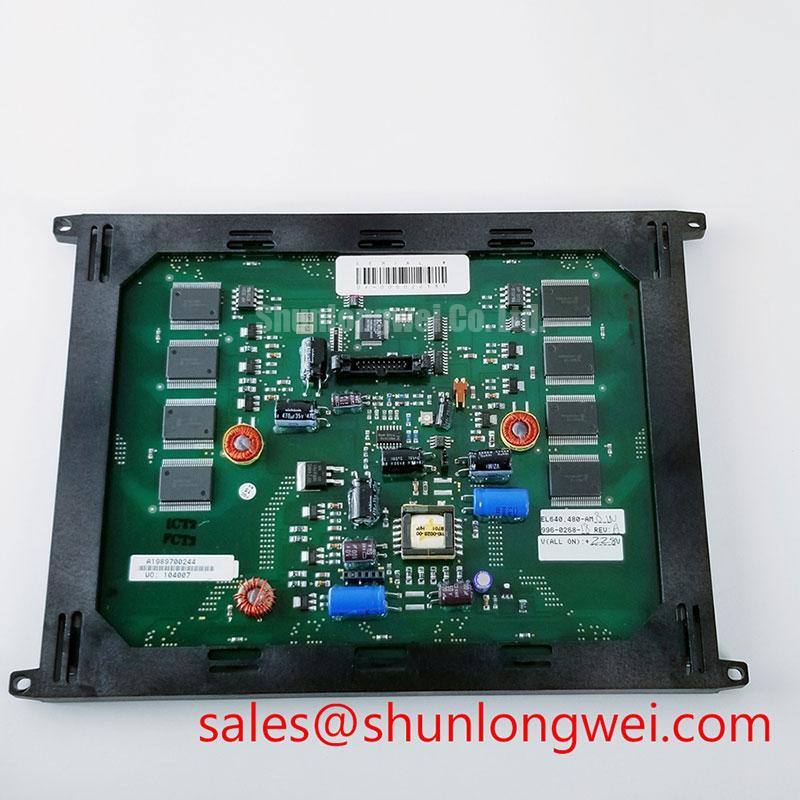
With power removed, inspect the Planar EL640.480-AA1 display module, its bezel seating, connector retention, and cable strain relief before reconnecting any supply or signal path. The EL640.480-AA1 is an electroluminescent display module, not a TFT-LCD panel with a conventional LED or CCFL backlight. Confirm the complete module designation against the equipment bill of materials and original panel documentation before treating the unit as electrically or mechanically interchangeable.
The module should be assessed as part of the host display assembly rather than as an isolated display. The system integrator should verify the required supply voltage, interface assignment, display timing, mounting geometry, drive arrangement, and power sequencing from the original equipment documentation. Those details are system dependent and are not established by the product designation alone.
A dark-field complaint should begin with a mechanical check while the display remains unpowered. Place the module on a clean, flat, electrostatic-controlled work surface and inspect whether the enclosure, retention frame, front cover, or adjacent gasket is applying uneven pressure around the visible area. Localized bright or dark regions can be associated with enclosure loading, panel stress, optical contamination, electrical drive behavior, or illumination-path behavior in systems that include separate optical components. The observed pattern alone does not establish the cause.
For the Planar EL640.480-AA1, chassis dimensions, bezel clearance, approved fixing points, and fastener torque should be taken from the original equipment mechanical drawing or panel documentation. A mounting frame that is too tight can transfer force into a display assembly; a frame with inadequate restraint can permit vibration, connector movement, or uneven contact with protective layers. Both conditions deserve inspection when a dark image makes nonuniformity more visible.
Design Consideration: distribute retaining force through the host equipment’s intended mounting features and keep the display face free from point loading. Confirm that the bezel does not bow when its fasteners are tightened, and verify the result with the equipment operating in its installed orientation. Do not derive a torque requirement for this model from generic fastener guidance when the original display assembly documentation is unavailable.
Moisture, dust, and cleaning residues may also affect the appearance of the display surface or front window. Where a host assembly uses perimeter sealing, inspect the surrounding enclosure condition without assuming the construction of the EL640.480-AA1 itself. Any cleaning material, sealant, or adhesive used during service should be compatible with the original equipment design and should not migrate into the display opening.
Field Alert: Disconnect and isolate power before inserting, removing, or reseating a display connector, because uncontrolled signal and supply pin contact can stress the host interface.
Do not assign a service-life value, brightness-retention figure, or field failure rate to this model without a manufacturer specification or documented test source. In practical service work, compare display uniformity and full-field appearance with a known-good terminal of the same system where available, then record the ambient condition, supply behavior, connector state, and mechanical loading present during the test.
Diagnosing a Dark or Non-Emitting Electroluminescent Display
When the host terminal appears black or fails to emit, first establish whether the system is booting and whether the display is receiving a valid drive signal. Check status indicators, controller activity, upstream display behavior, and any known-good display path specified by the equipment service procedure. A flashlight examination intended to reveal an image behind a failed LCD backlight is not an appropriate diagnostic for an electroluminescent display. A non-emitting panel may result from the display drive circuitry, connector path, power conditions, control timing, or the panel itself.
Use controlled image content rather than an unstructured visual judgment. If the host can provide suitable test patterns, examine uniform fields, characters, lines, and representative screen content one at a time. Record whether the symptom follows the image content, the cable position, the temperature condition, or the power-up cycle. Stable lines, intermittent bands, missing image areas, or total darkness can arise from several parts of the display system, including the host graphics source, cable assembly, connector contact, timing behavior, panel electronics, or display-drive circuitry.
The published product information identifies the unit as an electroluminescent display module but does not establish its complete signal interface, drive waveform, or operating temperature range. It is therefore inappropriate to assign a specific interface arrangement, logic rail, cold-temperature response, drive frequency, or internal driver construction to the EL640.480-AA1. Verify these requirements from the original Planar documentation and the equipment schematic before probing active terminals.
Engineering Recommendation: make measurements against a known-good signal path where one is available, using the host manufacturer’s reference points and safe probing method. Inspect the cable and mating connector for incomplete engagement, pin damage, contamination, or strain before interpreting waveform differences. Reseating a connector may change the symptom, but the result should be treated as a diagnostic observation rather than final proof of the underlying cause.
A display that behaves differently after warming may warrant examination of the entire terminal environment, including the host supply, enclosure airflow, cable routing, and controller start-up sequence. Avoid assigning the behavior to liquid-crystal response, LED backlight ageing, or an internal driver defect without documentation and comparison evidence. For broader service context covering display integration and environmental evaluation, see Industrial Display & HMI Solutions.
Display Drive, Brightness, and Flicker Investigation
Do not assume that the EL640.480-AA1 uses WLED illumination, CCFL illumination, PWM dimming, or any specific brightness-control ratio. As an electroluminescent display module, its electrical drive requirements must be verified from the original Planar documentation or the original equipment display assembly documentation. Do not substitute a conventional LED backlight driver for the specified display-drive circuitry.
During a dark-screen investigation, separate the display image path from the display-drive supply and control path as far as the documented equipment architecture allows. If the system has a dedicated display driver, inspect its supply input, enable behavior, control signals, output connection, protective shutdown condition, and thermal environment according to the host service documentation. Do not apply an external driver or experimental supply unless the official connection details explicitly permit it.
Design Consideration: brightness instability, visible flicker, audible noise, and sudden loss of emission can be influenced by the driver, its control signal, cable connection, load condition, mechanical assembly, and host power quality. A repeatable test should hold the image source and ambient conditions constant while documenting the operating state. The system engineer should then verify peak and steady-state conditions using the equipment’s approved limits.
Power sequencing deserves the same discipline. A dim or unstable start-up image, or intermittent return after power cycling, may be associated with the order and timing of system rails, signal enable, controller reset, display drive, or display initialization. Because no sequencing values are supplied here for this model, no numerical timing prescription should be applied. Verify the host sequence against its schematic and original display documentation, then compare it with a known-good terminal where possible.
Industrial HMI screens can remain on static pages for extended periods. Operators and maintainers should assess the application’s image-management settings, sleep behavior, brightness settings, and screen refresh practices at the system level. These are host-level controls and should not be represented as guaranteed characteristics of the Planar EL640.480-AA1.
Display Thermal Management and Environmental Evaluation
The available product information does not confirm a high-brightness rating, LED rail arrangement, light guide plate, L70 rating, or B50 rating for the EL640.480-AA1. Those terms should not be treated as factory specifications for this Planar module. When thermal symptoms are suspected, the correct service approach is to inspect the actual host assembly and validate its intended heat-transfer path using the original equipment documentation.
Look for blocked vents, detached thermal interfaces, warped brackets, accumulation near airflow paths, heat sources placed close to the display, and enclosure modifications that were not part of the original build. Display appearance and drive behavior can change with enclosure temperature and thermal gradients, but a visual symptom does not identify a material-level mechanism. Record the condition under repeatable operation, then compare the unit against a verified working installation when possible.
Engineering Recommendation: preserve the host system’s intended conductive and convective paths, particularly around components that support the display, drive electronics, or controller. Avoid adding adhesives, foam, heat spreaders, or interface materials without confirmation that they will not obstruct the display area, alter the mounting load, or conflict with equipment clearances. The final thermal arrangement is determined by the system design and should be validated in the completed enclosure.
For potential use in railway passenger information systems or cab signalling displays, the EL640.480-AA1 should be evaluated only against the original terminal’s documented electrical, mechanical, environmental, and interface requirements. The product designation identifies a Planar electroluminescent display module, while interchangeability remains dependent on the complete equipment-level specification.