Content last revised on October 16, 2026
Tianma Japan NL6448AC33-A1D Industrial LCD Display Module
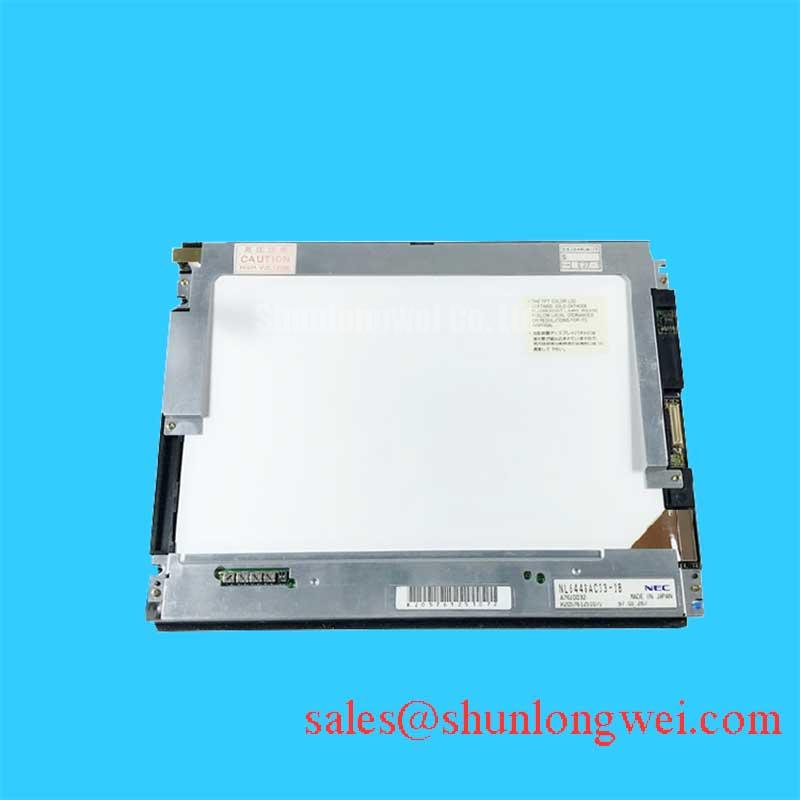
When a diagnostic console shows a dark corner, unstable image, or intermittent panel connection, first isolate the display from the host system and inspect the bezel, cable seating, backlight behavior, and active image area under controlled illumination. The NL6448AC33-A1D is a 10.4-inch VGA TFT LCD active matrix color display module documented by Tianma Japan for industrial use. Its resolution is 640 × 480 pixels. ([tianma.co.jp](https://www.tianma.co.jp/common/pdf/en/nl6448ac33-a1d.pdf))
For incoming inspection, record the exact model marking, connector orientation, mounting pattern, and visible panel dimensions before removing the existing unit. The replacement decision should be based on mechanical envelope, signal interface, supply requirements, backlight arrangement, and controller compatibility rather than panel size alone. The manufacturer is Tianma Japan, whose LCD business previously operated under the NEC and NLT names, while the product category is Industrial LCD/HMI Panel. ([tianma.co.jp](https://www.tianma.co.jp/en/profile/history.html))
- Model: NL6448AC33-A1D
- Manufacturer: Tianma Japan
- Product category: Industrial LCD/HMI Panel
- Display construction: TFT LCD active matrix color display module
- Signal interface: CMOS, 6-bit RGB
- Integration role: Replacement or evaluation panel for compatible industrial HMI and diagnostic display equipment
The manufacturer specifies a 3.3 V or 5.0 V supply for the LCD signal processing board and a separate 12.0 V supply for the built-in LED driver. These are nominal supply values, not interchangeable connections; confirm supply tolerances, sequencing, and connector pin assignments in the full datasheet before applying power. A touch function should not be assumed from the LCD model number. A resistive or capacitive touch overlay may be added by the equipment manufacturer, but touch performance should be assessed as a complete assembly. ([tianma.co.jp](https://www.tianma.co.jp/common/pdf/en/nl6448ac33-a1d.pdf))
Flush Mount Open Frame Bezel Integration and Perimeter Gasket Shock Isolation
Begin mechanical evaluation by placing the panel in the intended bezel without power and checking whether the perimeter gasket contacts evenly on all sides. A frame that pushes harder at one corner can create visible dark field variation, uneven pressure marks, or a change in image uniformity after the fasteners are tightened. The chassis outer bezel envelope, panel edge clearance, gasket compression, and cable bend radius should therefore be measured as one assembly.
The supplied mechanical drawing should control the mounting hole pattern and allowable edge clearance. Do not transfer the dimensions of another NEC or Tianma panel into this installation without comparison. The linked NL8060BC21-09 can be reviewed as a separate display reference during replacement planning, but its mechanical and electrical characteristics should not be treated as interchangeable with NL6448AC33-A1D.
For the specified mounting hardware, a cross pattern is a useful Design Consideration because it distributes contact pressure instead of loading one side first. The datasheet limits product mounting screw torque to 0.294 N·m maximum and screw length to 3.0 mm maximum. Follow the outline drawing and check for bezel distortion and dark field change after tightening. ([285624.selcdn.ru](https://285624.selcdn.ru/syms1/iblock/f02/f02a08b72119e2e040e56625306c385f/d0364adc5c2b03c347a91ff24c92ad99.pdf))
Signal integrity should be checked at the panel connector after the mechanical fit is complete. The host transmitter standard, clock relationship, data hold time, and cable assignment must match the original display interface. This module uses a CMOS 6-bit RGB interface, not a direct LVDS input; inspect clock and data transitions at the receiving end rather than relying only on continuity testing. Across the intended operating temperature window, the engineering team should compare timing margin, edge distortion, and intermittent image faults against a known good assembly. Connector strain, shield termination, and return current paths can affect the result even when every conductor has continuity. ([tianma.co.jp](https://www.tianma.co.jp/common/pdf/en/nl6448ac33-a1d.pdf))
Bench Tip: Disconnect power before handling the display connectors. Use ESD protection and engage the display cable perfectly square before locking the connector, because an angled insertion can damage contacts or produce intermittent image faults that resemble a panel failure.
| Evaluation item | NL6448AC33-A1D | Replacement decision point |
|---|---|---|
| Manufacturer | Tianma Japan | Confirm the equipment service record and panel marking |
| Display type | TFT LCD active matrix color module | Match the host controller and signal format |
| Mechanical envelope | 227.3 mm width and 177.5 mm height, both typical; 9.8 mm maximum depth | Compare bezel envelope and mounting locations |
| Touch function | Do not assume an integrated touch function | Verify the complete touch overlay assembly separately |
| Backlight drive | LED backlight with built-in LED driver | Match the driver supply, control signals, and connector |
The mechanical envelope and built-in backlight driver are documented in the manufacturer's product summary; use the full outline drawing for installation clearances. ([tianma.co.jp](https://www.tianma.co.jp/common/pdf/en/nl6448ac33-a1d.pdf))
Surface Anti Glare and Anti Reflective Treatment for High Ambient Readability
Assess the front surface with the display operating at representative image levels, then repeat the inspection under directional room light and reflected task lighting. A matte anti glare surface can reduce mirror reflections, while an anti reflective treatment can reduce the brightness of the reflected image; these are different optical functions and should not be treated as interchangeable. The manufacturer specifies an antiglare polarizer surface for NL6448AC33-A1D; this does not establish a separate anti reflective coating. ([tianma.co.jp](https://www.tianma.co.jp/common/pdf/en/nl6448ac33-a1d.pdf))
For an HMI or diagnostic console, viewability should be checked using small text, thin lines, grayscale ramps, and saturated primary colors. Pay attention to the angle at which text loses contrast, not only to the center of the screen. A symmetric viewing cone such as 85 degrees in four directions is a possible system evaluation criterion for some display designs, but it is not an official NL6448AC33-A1D specification in the supplied product data.
TN, IPS, and MVA technologies can show different grayscale behavior as the operator moves away from the normal viewing axis. The correct acceptance method is to compare the intended viewing positions with the actual image content used by the equipment. In surgical navigation or ultrasound consoles, image interpretation can depend on subtle grayscale transitions, so glare, ambient reflection, and viewing angle should be recorded together rather than judged from a single static photograph.
Backlight dimming also belongs to the host system evaluation. If the equipment applies PWM control, the engineer should verify the actual frequency, duty cycle response, acoustic behavior, and visible flicker with the installed driver. The datasheet specifies a PWM frequency range of 200 Hz to 1 kHz, a duty ratio of 10% to 100%, and a minimum pulse width of 100 µs; both duty and pulse-width limits must be respected. The measurement should include low brightness operation, because nonlinear duty response may become more noticeable near the lower end of the control range. ([285624.selcdn.ru](https://285624.selcdn.ru/syms1/iblock/f02/f02a08b72119e2e040e56625306c385f/d0364adc5c2b03c347a91ff24c92ad99.pdf))
When another backlight or display solution is being compared, NL6448BC33-64 may be reviewed as a separate NEC display reference. Its interface, optics, backlight electrical requirements, and physical fit require independent confirmation before any substitution decision.
Backlight Luminance and LED Half Life Verification
Check luminance uniformity after the panel has reached a stable operating condition, using the same camera position, diffuser arrangement, and brightness setting for every sample. A narrow display frame can develop visible edge to center differences when heat is concentrated near the backlight or when the chassis restricts heat spreading. The mechanical assembly should therefore provide a stable thermal path without pressing directly on sensitive display areas.
An aluminum heat spreader rail may be evaluated as a general mechanical and thermal measure where the equipment enclosure permits it, but its size, contact method, and insulation must be determined by the complete product design. The datasheet estimates a mean LED time to half-luminance of 100,000 hours at 25°C product ambient temperature, or 50,000 hours at 80°C LCD panel and rear shield surface temperature, under continuous operation at 100% PWM duty. These are estimates for the LEDs, not guaranteed lifetimes for the complete LCD module, and should not be reinterpreted as L70 or B50 ratings. ([285624.selcdn.ru](https://285624.selcdn.ru/syms1/iblock/f02/f02a08b72119e2e040e56625306c385f/d0364adc5c2b03c347a91ff24c92ad99.pdf))
For service analysis, compare brightness at startup and after the unit has operated under its normal enclosure conditions. A gradual reduction across the whole screen suggests a different investigation path from a localized bright or dark region. Inspect the backlight connector, driver output behavior, current regulation, and thermal contact before attributing the symptom to the LCD cell. The module has a built-in LED driver; verify any open circuit, short circuit, or overvoltage protection behavior from the applicable documentation rather than assuming that protection is external or that every protection function is provided.
High ambient illumination requires an optical test rather than a nominal brightness claim. Direct sunlight or a high illuminance simulator can reveal reflection problems that are invisible under laboratory room lighting. A contrast target above 500 to 1 at 50,000 lux may be used as a system level acceptance goal where the application requires it, but it is not an official rating supplied for this model. Record the surface condition, viewing direction, image pattern, and exposure level with every result.
The industrial display principles described in The Ultimate Guide to Industrial TFT LCD Technology provide useful background when separating panel optics, backlight behavior, and enclosure effects. For broader industrial display and optical application context, engineers can also consult Tianma Japan Industrial TFT Display Solutions.
Full Screen Primary Color AOI Screening for Stuck Sub Pixels and Uniformity
Run a full screen inspection using black, white, red, green, and blue image fields before accepting a replacement display. On the black field, look for luminous points, edge leakage, vertical bands, and uneven backlight zones. On the white field, check tint variation and localized shadowing. Red, green, and blue fields help separate stuck sub pixels from broader illumination or signal path problems.
A 45 degree flashlight inspection can assist with dark shadow analysis after the powered image test. Move the light across the front surface without touching the panel and observe whether a suspected mark changes with reflection. A feature that remains fixed within the image may require signal or pixel level investigation, while a feature that moves with the light may be related to surface contamination or reflection. This observation narrows the test path without assigning a single cause prematurely.
For suspected driver line defects, compare the same image through the original controller, cable, and display where possible. For a narrow vertical line, intermittent section, or color dependent defect, trained personnel should disconnect power before inspecting or reseating the cable, keep the panel secured and protected from flexing, and then retest the image. The inspection should distinguish a connector seating problem, controller timing issue, backlight nonuniformity, and an actual display cell defect.
AOI records should include the image pattern, screen temperature, brightness setting, viewing distance, and defect location grid. Use consistent terminology for stuck sub pixels, dead areas, mura, edge leakage, and cable induced artifacts. The result should be attached to the equipment service record so that a later replacement can be compared against the same acceptance method rather than against memory or an uncalibrated photograph.
For systems used in high precision surgical navigation or ultrasound diagnostic displays, the integrator should also verify touch overlay alignment, glove operation, wet finger response, electromagnetic interference behavior, and image recovery after any documented backlight driver protection events. These are complete equipment characteristics, not automatic properties of the LCD module. The datasheet requires prior manufacturer consultation for applications outside its Standard quality grade, including surgical equipment monitors. The final acceptance decision should follow the original panel documentation and the host system test limits. ([285624.selcdn.ru](https://285624.selcdn.ru/syms1/iblock/f02/f02a08b72119e2e040e56625306c385f/d0364adc5c2b03c347a91ff24c92ad99.pdf))