

Content last revised on October 13, 2026
Incoming Benchtop Inspection: Driver-Bond and Image Integrity
- Disconnect equipment power before inspecting the AA104VC02 connectors, cable contacts, retaining latches, and mounting points.
- Match the panel identification to the equipment service record and check the controller cable orientation before connection.
- Inspect the bezel opening and mounting supports for contact with the display surface, cable pinching, or uneven seating.
- Prepare a compatible controller and full-screen color patterns before testing image generation and illumination separately.
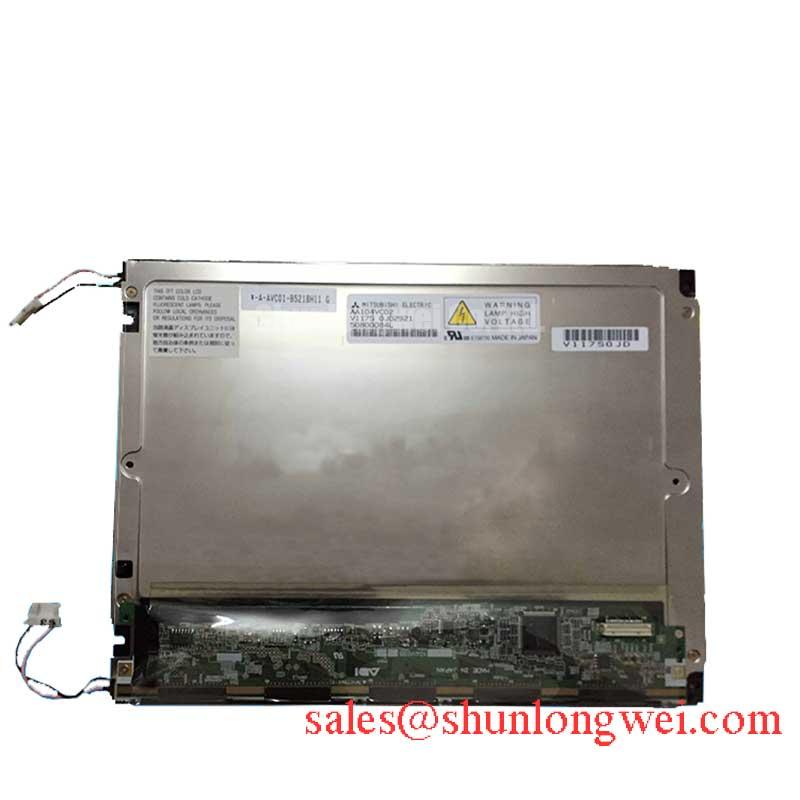
The AA104VC02 from Mitsubishi Electric is a TFT-LCD active-matrix color display module in the industrial LCD/HMI panel category. Replacement assessment should establish electrical, optical, and mechanical compatibility independently: matching a model family or external appearance does not establish interchangeable operation.
| Product identity | Specification or verification requirement |
|---|---|
| Model | AA104VC02 |
| Manufacturer | Mitsubishi Electric |
| Product category | Industrial Grade LCD/HMI Panel |
| Module type | TFT-LCD Active Matrix Color Display Module |
| Electrical and dimensional limits | Consult the applicable manufacturer datasheet for supply voltage, interface, connector assignment, resolution, outline dimensions, mounting requirements, and operating limits. |
Display full-screen red, green, and blue patterns sequentially, recording whether each defect remains at the same physical location. As a Design Consideration, this primary-color test helps separate persistent line defects from content-dependent artifacts, but it does not identify a failed driver bond by itself. Repeat the observation with a neutral image and compare the results with a known-good controller and cable.
If the screen appears dark, illuminate it obliquely with a flashlight while valid image data is present. A faint visible image suggests that image generation and illumination need separate investigation. An absent image warrants checks of panel power, controller output, cable continuity, and enable sequencing. Neither observation proves an internal bond fracture, and pressing the panel edge is not a reliable diagnostic technique.
COG, TAB, and anisotropic conductive film describe display-interconnection technologies, not confirmed construction details for this model. Persistent rows or columns can justify specialist assessment after external faults have been excluded. Inspect accessible cable terminations without peeling protective films or disturbing bonded assemblies.
For the external flexible cable, check latch engagement, contact alignment, and strain relief. A cable that becomes taut when the enclosure closes can transfer force into its connector during vibration. Route it with a relaxed bend and prevent repeated flexing at the connector exit; bend endurance depends on the actual cable construction and movement profile, rather than a universal service-life figure.
Chassis Fastener Loading and Optical Mura Control
Check the AA104VC02 mounting supports for coplanarity before tightening the chassis fasteners. Under a Design Consideration, uneven support or bezel pressure can produce optical nonuniformity, commonly called mura, even when the display electronics are functioning correctly. Compare a uniform dark-gray image before installation and after enclosure assembly to identify changes associated with mechanical loading.
Fastener diameter alone does not establish an acceptable tightening torque. Thread engagement, bracket material, inserts, washers, and the module mounting specification all affect the joint. Use the approved assembly requirements and tighten progressively in a balanced sequence, inspecting whether the display frame distorts or the image changes. Do not treat a generic chassis torque as an AA104VC02 factory limit.
Compare the bezel opening with the module outline and active viewing area. The enclosure should retain the display without pressing on the viewing surface or trapping its cable. For vibration-sensitive installations, designers should evaluate compliant support against positional stability: excessive restraint transfers chassis distortion, while insufficient restraint allows movement and connector loading.
Optical bonding also belongs to the enclosure-level assessment. Adhesive compatibility, cure stress, cover-window expansion, and edge sealing require validation as an assembly. Bonding does not, by itself, establish moisture resistance or an ingress-protection rating. After assembly, inspect uniform images for localized shading and verify that the seal does not impose pressure on the panel.
A comparison with AA104VC07 should use connector assignments, timing, optical characteristics, and mechanical drawings rather than naming similarity. AGV operator displays and forklift telematics terminals are potential compatibility-assessment examples, subject to controller matching, enclosure protection, and vibration qualification; they are not established application approvals for AA104VC02.
Suppressing Pixel Jitter and Horizontal Lines Near Motor Drives
Compare the displayed image with the adjacent motor drive inactive and operating, keeping the test pattern and display configuration unchanged. As a Design Consideration, interference that follows drive activity warrants investigation of cable routing, controller grounding, supply disturbances, and receiver timing. Horizontal lines or pixel instability are observations, not proof of one particular failure mechanism.
Establish the actual AA104VC02 interface before applying signal-integrity rules. Differential-link impedance and intra-pair skew belong to the applicable transmitter, receiver, and cable specification. Parallel digital interfaces instead require attention to clock-to-data relationships, return paths, and setup and hold timing. JEIDA/VESA mapping is relevant only when supported by the documented link format; an incorrect mapping can corrupt colors without indicating panel damage.
Pro Tip: Where the documented interface uses differential pairs, preserve pair geometry and matched routing through connectors, then validate timing at the receiver rather than relying on trace appearance.
Shield termination and common-mode suppression should follow the equipment grounding architecture. Evaluate cable separation from switching-power conductors first, then assess shielding changes or suppression components through controlled testing. A ferrite is not a universal remedy: its effect depends on frequency, cable configuration, and the coupling path. Avoid modifications that compromise the intended signal return.
Capture supply behavior and clock/data relationships during startup, steady operation, and shutdown. Power sequencing should prevent the controller from driving an unpowered panel outside its interface limits. Investigate white-screen startup and shutdown artifacts against the prescribed enable sequence rather than adding arbitrary delays. The Industrial Display & HMI Solutions resource provides broader integration context for these equipment-level checks.
Backlight Thermal Management and Optical Stack Preservation
Measure temperature distribution around the installed AA104VC02 and its illumination electronics under representative enclosure conditions. As a Design Consideration, distinguish heat generated within the display assembly from heat entering through nearby electronics or the chassis. Evaluate thermal interfaces without creating concentrated mechanical loads on the display frame.
Match illumination control to the documented backlight architecture and driver requirements. Brightness adjustment should remain within the approved electrical operating conditions, with tests checking uniformity, flicker, and driver temperature. Do not assign LED-rail construction, a PMMA light-guide material, or a brightness-maintenance lifetime to this model without manufacturer evidence.
The Tianma NLT Industrial TFT-LCD Display Technologies resource offers industry context for industrial display and optical technologies, but does not establish Mitsubishi AA104VC02 specifications. Backlight lifetime definitions and test conditions must remain associated with the product documentation that supplies them.
For interfaces displaying fixed graphics, assess image retention with representative content and recovery patterns. Consider screen blanking or content changes where the equipment workflow permits, then distinguish persistent artifacts from temporary retention through repeatable observations. Finish thermal validation with the enclosure closed, checking image uniformity, connector retention, and illumination stability after the assembly reaches its operating condition.