


Content last revised on October 4, 2026
Assembly Integrity and Layout Architecture for GP370-SC11-24V
| Model | GP370-SC11-24V |
| Manufacturer | Pro-face |
| Product category | Industrial Grade LCD/HMI Panel |
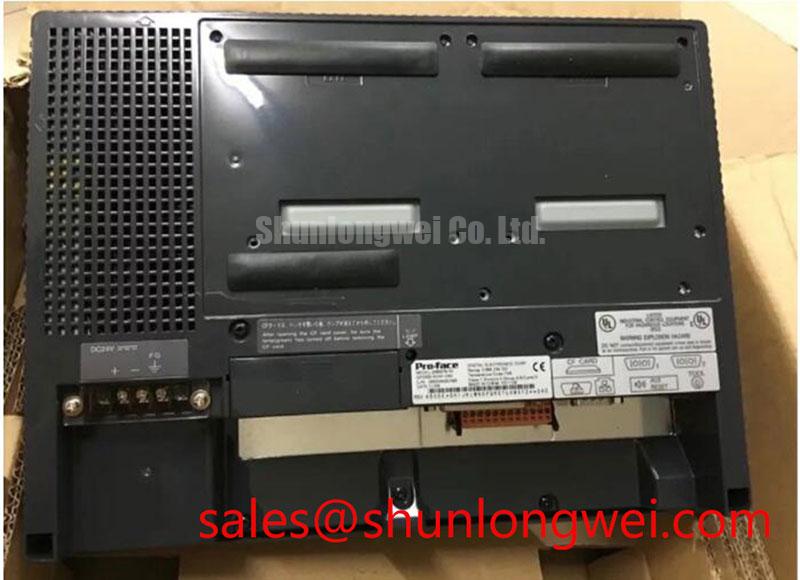
| Enclosure or assembly | HMI Touch Screen Assembly |
| Specification status | Official Factory Spec Verified |
Inspect the glass surface, bezel, touch assembly, cable entry points, and mounting interface under controlled illumination before connecting the panel to a live control cabinet. Look for cracks, pressure marks, edge separation, contamination, or a connector that does not sit squarely in its socket. These checks establish whether a later display fault is associated with the panel assembly, the external harness, or the host equipment.
GP370-SC11-24V is identified as a Pro-face Industrial Grade LCD/HMI Panel with an HMI touch screen assembly. The supplied product information does not establish a display resolution, panel technology, optical contrast ratio, backlight architecture, touch controller type, connector pinout, or electrical input rating beyond the model designation. Those values should not be substituted with assumptions from another Pro-face panel. The system integrator should verify the required supply voltage, signal interface, and mechanical cutout from the original equipment documentation before installation.
For a control cabinet used with a grid-tied static var compensator or thyristor-switched capacitor system, the panel should be evaluated as the operator interface rather than as part of the high-voltage switching path. Separate the HMI wiring from high-current AC conductors and switching-device gate or trigger wiring where the cabinet layout permits. This is a Design Consideration intended to reduce the possibility that conducted or radiated switching disturbances will interfere with touch responses, communication signals, or display stability. The final spacing, shielding, bonding, and filtering arrangement remains system-dependent and should be verified during switching tests.
Check the front surface across a series of solid test screens. White, black, red, green, and blue fields make non-uniform illumination, stuck pixels, line defects, and localized contamination easier to see than a normal process screen. Allow the panel to reach a stable operating condition before judging brightness uniformity. If the host system cannot generate test fields, use a service image or an external display test source that is compatible with the confirmed interface.
Strong ambient light can make a healthy display appear weak, while reflections from cabinet windows can be mistaken for uneven backlight output. Treat anti-glare or anti-reflection performance as an integration question unless the original Pro-face documentation provides a confirmed surface specification. A Design Consideration for SVC control rooms is to assess the installed viewing angle, cabinet window reflection, and operator position under the actual lighting environment rather than relying on a nominal contrast figure.
The touch surface also requires a separate inspection. Test the four corners, the center, the edge region, and the controls most frequently used by operators. A panel that displays correctly can still have an intermittent touch response caused by a poor cable connection, mechanical stress, contamination, or a host-side touch interface problem. Record the exact location and repeatability of each missed input rather than assigning a single cause from one test.
When the HMI is installed near a capacitor bank or thyristor switching assembly, cable routing should preserve a clean return path and avoid unnecessary parallel runs beside impulsive power conductors. This is an Engineering Recommendation, not a factory specification for GP370-SC11-24V. Confirm the result by monitoring the display, touch events, and communication status while the associated power equipment passes through its normal operating sequence.
Field Diagnostics and Commissioning of GP370-SC11-24V in SVC Topologies
Measure the confirmed input rails at the panel connector with the cabinet in its normal operating state, then compare the reading at the HMI end with the reading at the source end while the display is starting. Observe whether the panel resets, dims, loses touch input, or drops communication during a capacitor switching event. A voltage disturbance, ground-reference shift, cable coupling issue, or host-controller event may produce similar symptoms, so capture the timing of each event before replacing the assembly.
The 24V reference in the model name should not be treated as a substitute for the original wiring documentation. Verify polarity, connector position, protection arrangement, and the permitted input conditions from the equipment documentation used for the existing installation. Do not apply an unconfirmed supply to a replacement panel. A bench supply can be useful for isolation testing only when its voltage, current capability, grounding arrangement, and connector wiring have been confirmed for the panel.
During commissioning, create a simple event record containing the panel start time, screen condition, touch response, communication status, and the switching state of the SVC controller. If a fault appears only when the firing sequence changes, use an oscilloscope or suitable recorder on the known-good signal path and the HMI supply path. The objective is to identify correlation without claiming that a particular firing angle, converter state, or panel function is the sole cause.
AC-to-DC conversion behavior in the surrounding power system changes with topology, control angle, load, source impedance, and reactive power demand. Those characteristics belong to the SVC or thyristor-switched capacitor design and are not electrical ratings of the GP370-SC11-24V display assembly. The HMI can present the measured values and alarms, but its screen data should be compared with the controller's internal measurements when commissioning control logic.
Evaluate the panel with the same operating pages that will be used in service. Fast-changing numeric tags, alarm banners, trend objects, and repeated touch commands can reveal communication or application-layer problems that remain hidden on a static screen. If only one graphic object fails to update, compare its tag source, refresh behavior, and controller status with a known-good object. If the whole screen changes state, inspect the shared supply, interface, and controller event log.
Backlight diagnosis should begin with visual uniformity, start-up behavior, and current-driver or backlight feedback information available from the host system. The supplied factory data does not confirm a backlight type, constant-current architecture, PWM control range, open-load protection, short-circuit protection, overvoltage response, or a 50,000-hour brightness-retention rating for this exact assembly. These functions must be verified from the original panel documentation or measured at the system level. A dark screen with a visible image, an intermittent screen, and a complete loss of image can involve different sections of the display path.
Bench Tip: Use ESD protection, keep the flexible cable flat and fully aligned during insertion, and lock the connector only after the contacts are evenly seated.
Transient Dynamics and Electrical Design around GP370-SC11-24V
Probe the panel supply and communication reference at the assembly connector during the same switching event that produces a visible disturbance, using a measurement setup whose bandwidth and grounding do not introduce a false transient. Compare the waveform with the controller-side reference and note whether the disturbance occurs before the image changes, at the same instant, or after the display recovers. This sequence helps separate supply integrity, signal integrity, and application timing without assigning an unsupported failure threshold.
Thermal conditions should be checked at the installed panel surface, enclosure interior, cable region, and power-conversion area adjacent to the HMI. The available product information does not specify junction-to-case thermal resistance, baseplate construction, heatsink requirements, thermal paste, or a permissible internal temperature for GP370-SC11-24V. Those parameters are therefore not applicable as assumed module data. For an HMI, the practical measurement is the temperature profile of the complete installed assembly and its surrounding cabinet, followed by verification against the original Pro-face service documentation.
Do not transfer IGBT or thyristor thermal calculations to the LCD/HMI assembly. The display does not become a switching semiconductor because it is mounted in the same cabinet. It may, however, be exposed to the electrical and thermal environment created by the switching equipment. Designers should minimize unnecessary heat transfer, keep airflow paths available, and verify display operation at the actual cabinet conditions during a representative duty cycle.
PWM dimming requires particular caution. The supplied information does not confirm that this model accepts user-controlled PWM dimming, nor does it state a permitted dimming frequency or duty-cycle range. The frequently discussed range of 200 Hz to 1 kHz must therefore be treated only as a system-level Design Consideration, not as an official GP370-SC11-24V specification. If the host equipment controls brightness, verify whether the command is digital, analog, internal, or unavailable, then check for visible flicker, audible interaction, image modulation, and driver stress under the approved operating conditions.
For optical inspection, test the display at its normal brightness setting and at any service-adjustable settings documented for the panel. Compare the center and edge regions using the same camera position or photometric method. Direct sunlight, cabinet glazing, and operator angle can change the perceived result substantially. An anti-glare or anti-reflection claim should be made only when the exact panel documentation identifies the surface treatment. Otherwise, assess the installed viewing condition and select enclosure shading or viewing geometry as a system design matter.
A touch panel used with gloves or in the presence of moisture also needs application-specific testing. Do not assume that the GP370-SC11-24V uses a capacitive or resistive sensing method from the product category alone. Test the actual replacement assembly with the intended glove material, finger pressure, water condition, and screen protection arrangement. A missed touch may result from the sensing technology, surface contamination, operator technique, cable integrity, or controller configuration. Record the test conditions so that later service personnel can reproduce the observation.
Industrial Surge Immunity and Interface Protection for GP370-SC11-24V
Capture the panel-side supply and communication lines during a controlled cabinet surge or switching-immunity test, then inspect the HMI for reset, loss of image, false touch events, communication interruption, and recovery behavior. Do not connect the display directly to a test impulse without confirming the complete equipment test plan, isolation arrangement, and permitted stress levels. The panel's response must be evaluated as part of the installed system rather than treated as an independent surge-certified device.
IEC 61000-4-5 testing, MOV selection, RC snubber placement, and thyristor-junction protection belong to the SVC power topology. They are not confirmed features or ratings of the GP370-SC11-24V HMI assembly. Protection components should be selected from the system's nominal voltage, fault current, coordination requirements, clamping behavior, energy capability, and safety design. The system engineer must validate the resulting peak margins during switching and surge tests; no unverified MOV value, snubber value, surge class, or immunity level should be attributed to this Pro-face panel.
At the HMI interface, inspect the protective-earth and signal-reference arrangement, cable shield termination, connector retention, and separation between display wiring and the capacitor-bank switching loop. A clean enclosure bond and a controlled return path can reduce susceptibility, but the correct implementation depends on cabinet construction and the communication interface confirmed for the panel. Avoid adding a shield termination or filter that conflicts with the original equipment grounding scheme.
For a display that resets during switching, compare three conditions: the panel powered from the installed source, the panel powered through the approved service arrangement, and the controller operating with the switching sequence disabled. Record whether the image, touch function, and communication channel fail together or independently. This evidence is more useful than replacing several parts at once because it preserves the distinction between a display assembly issue and a cabinet-level disturbance.
Backlight fault diagnosis should include a visual test at start-up, inspection of the image under oblique light, and verification of the host-side status information where available. The current information does not confirm open-circuit, short-circuit, or overvoltage protection inside this particular assembly. If the original equipment exposes a backlight alarm or diagnostic output, compare it with the observed optical condition and supply waveform. If no diagnostic output exists, document the symptom and test the confirmed interface path rather than inventing a numeric threshold.
Use the practical evaluation methods in The Ultimate Guide to Industrial TFT LCD Technology when comparing viewing conditions, signal behavior, and enclosure integration. The reference can support a broader engineering review, while the exact connector definition, optical data, touch technology, environmental limits, and electrical ratings for GP370-SC11-24V remain tied to the original Pro-face documentation.
After the panel passes the visual, touch, supply, communication, and switching-event checks, secure the assembly without introducing bezel pressure or cable strain. Run the same operator pages used by the SVC control system, including alarm acknowledgement and trend display, while observing the panel through the relevant switching sequence. Record the final installation condition, confirmed interface details, and measured behavior for future service work.